World

Topics from outside of this forum. Views and opinions represented here may not reflect those of this forum and its members.

A world of content at your fingertips…

Think of this as your global discovery feed. It brings together interesting discussions from across the web and other communities, all in one place.

While you can browse what's trending now, the best way to use this feed is to make it your own. By creating an account, you can follow specific creators and topics to filter out the noise and see only what matters to you.

Ready to dive in? Create an account to start following others, get notified when people reply to you, and save your favorite finds.

Register Login
  • mariogripM

    Hey everyone,

    Looking for people willing to test an early build of Ubuntu Touch based on Ubuntu 26.04. This is a hidden channel, so you'll need to switch to it manually using system-image-cli or enable hidden channels in the installer.

    Fair warning: this is an early release, bugs are expected and very much part of the deal. That said, I'm running it as my daily driver, so it's functional enough for real-world use. 🙂

    What's New (some of them, there are many)

    This is a proper Ubuntu 26.04 base, not just a package bump. The big changes compared to the current stable channel:

    Qt6 + QtWebEngine 6.10 — The browser stack is fully upgraded to Qt6. This is a significant change that affects Morph browser and anything using the web engine. Better web compatibility, better performance. This is probably the most impactful change for daily use.

    Qt5 also updated — Qt 5.15.13 → 5.15.18 across the board.

    Core system updated — glibc 2.39 → 2.43, Python 3.12 → 3.14, GCC 14 → 16, LLVM 17 → 21, GStreamer 1.24 → 1.28, PulseAudio 16.1 → 17.0, Boost 1.83 → 1.90, OpenSSL 3.0 → 3.5, systemd patched for 26.04, and more.

    New packages — Qt6 variants of many Lomiri components are now shipping alongside Qt5 (content-hub, download-manager, online-accounts, action-api, ui-toolkit, etc.), which is the groundwork for a full Qt6 UI transition down the road. Morph browser now ships as morph-browser-qt6 / morph-webapp-container-qt6.

    Maliit now has a Qt6 inputcontext alongside Qt5.

    How to Switch

    Run the following on your device:

    sudo system-image-cli --switch 26.04-1.x/arm64/android9plus/daily
    

    Currently Available Devices

    Codename Device
    FP5 Fairphone 5
    Q25 Zinwa Q25 (BlackBerry Classic restomod)
    Spacewar Nothing Phone (1)
    algiz Volla Phone Quintus
    ansuz Volla Phone Plinius
    jingpad_a1 JingLing JingPad A1/C1
    mimameid_h12 Volla Phone 22 (Halium 12)
    mimir Volla Tablet
    vidofnir_esim Volla Phone X23 (eSIM)
    yggdrasil Volla Phone
    yggdrasilx Volla Phone X

    If your device isn't listed, it's not on this channel yet or not gotten the image enlargement yet.

    Reporting Bugs

    Report them right here in this thread. Include:

    • Your device model
    • What you were doing when it happened
    • Any error messages or logs if you have them
    • Whether it's reproducible

    Given the Qt6 browser switch, pay particular attention to anything web-related, sites that break (or start working 😄), performance issues, crashes in Morph, webapp containers not loading, that kind of thing. That's where the most interesting bugs are likely to be right now.

    Also please report broken apps.

    Every report helps. Even "everything works fine" is useful data. 🙂


    read more →
    @mariogrip Not realy a bug, but strange behaviour. On my Redmi Note 9 Pro, through the hidden channel, I have used installer to go in 26.04 This possibility disappears (guess it's not ready and have been removed). So I tried to switch back to 24.04-2.x and the phone is blocked (after successful install) at the Redmi logo. Switch to 24.04-1.x is possbible, not 24.04-2.x With 24.04-1.x installed, install 24.04-2.x is still blocked at starting logo.
  • G

    Hello

    This is not about using 20.04 when one runs 24.04, the installer allows for that.

    The idea is having updated the phone to the shiny last and best version, say 24.04-1.3, one learns that an essential feature is now not working any more.

    How to get back to 24.04-1.1 ? I don't see that in the installer, it installs the latest and greatest.

    Now this week-end I learned of a command line tool to manage updating: system-image-cli.

    We learned that it's possible to update to 26.04 using:

    sudo system-image-cli --switch 26.04-1.x/arm64/android9plus/daily
    

    now having switched to 26.04, if one wants to be back to the tested and true 24.04, it's easy:

    sudo system-image-cli  --switch 24.04-1.x/arm64/android9plus/stable
    

    However, this is bringing back the latest 24.04 version, 1.3, not the first version that could be upgraded to the desired value.

    When on 24.04-1.3 it's possible to revert to say 24.04-1.1 but the syntax is cheesy;

    sudo system-image-cli --build 1 -m 2
    

    it's difficult to get it right, the way to go is to add the -n (--dry-run) switch, that will display what will do the installer without the delay in downloading / rebooting / updating.

    Hope this helps 🙂


  • peat_psuwitP

    We've just released the RC image for Ubuntu Touch 24.04-1.3. Please take some time to switch your spare/development phone to the 24.04-1.x RC channel and test this update.

    Ubuntu Touch 24.04-1.3 is a maintenance release of 24.04-1.x series. This release contains mostly bug fixes and small improvements. The notable ones are:

    • Improved handling of desktop apps, including:
      • Allow launching X11 apps outside of Lomiri (e.g. from OpenStore/Snapz0r).
      • Fixed dangling placeholder windows and launcher entry when launching X11 apps.
      • Fixed launching applications written using GTK4.
    • Improved handling of docks with input devices such as NexDock.
    • Fixed playing back AMR voice message sent via MMS.
    • Fixed scaling factor being slightly off in certain applications (in particular apps which use Qt auto scaling or embeded webview).
    • Fixed shutdown hanging on some devices.
    • General bug fixes and security updates.

    To receive Ubuntu Touch 24.04-1.3 on a device running Ubuntu Touch 24.04-1.0 and later, heads to System Settings -> Updates -> Update Settings -> Release Channel, then select "24.04-1.x Release candidate". Go back to the previous page, and then install the available update.

    If your phone is running Ubuntu Touch 20.04 OTA-11, you can receive Ubuntu Touch 24.04-1.3 RC by first upgrading to Ubuntu Touch 24.04-1.2 first, then follow the above instructions.

    Please note that only critical and security fixes will be able to enter Ubuntu Touch 24.04-1.3 as this point. Normal bug fixes and new features will need to wait for our next release. Please do not discuss normal bug fixes and new features here.

    Ubuntu Touch 24.04-1.3 is expected to be released on 7 May 2026. We appreciate all testing we will receive.


    Note: there's no Ubuntu Touch 20.04 OTA available for testing at this time.


    read more →
    @sixwheeledbeast I have added a comment on my MR to point that the bug existed before 1.3. I have managed to revert my phone to 1.1 and I see the exact same thing. If anyone having a 20.04 phone read this, it would be interesting to check if this problem (switching the bluetooth indicator in the battery page has no effect) occurred on this old version.
  • V

    Hello,

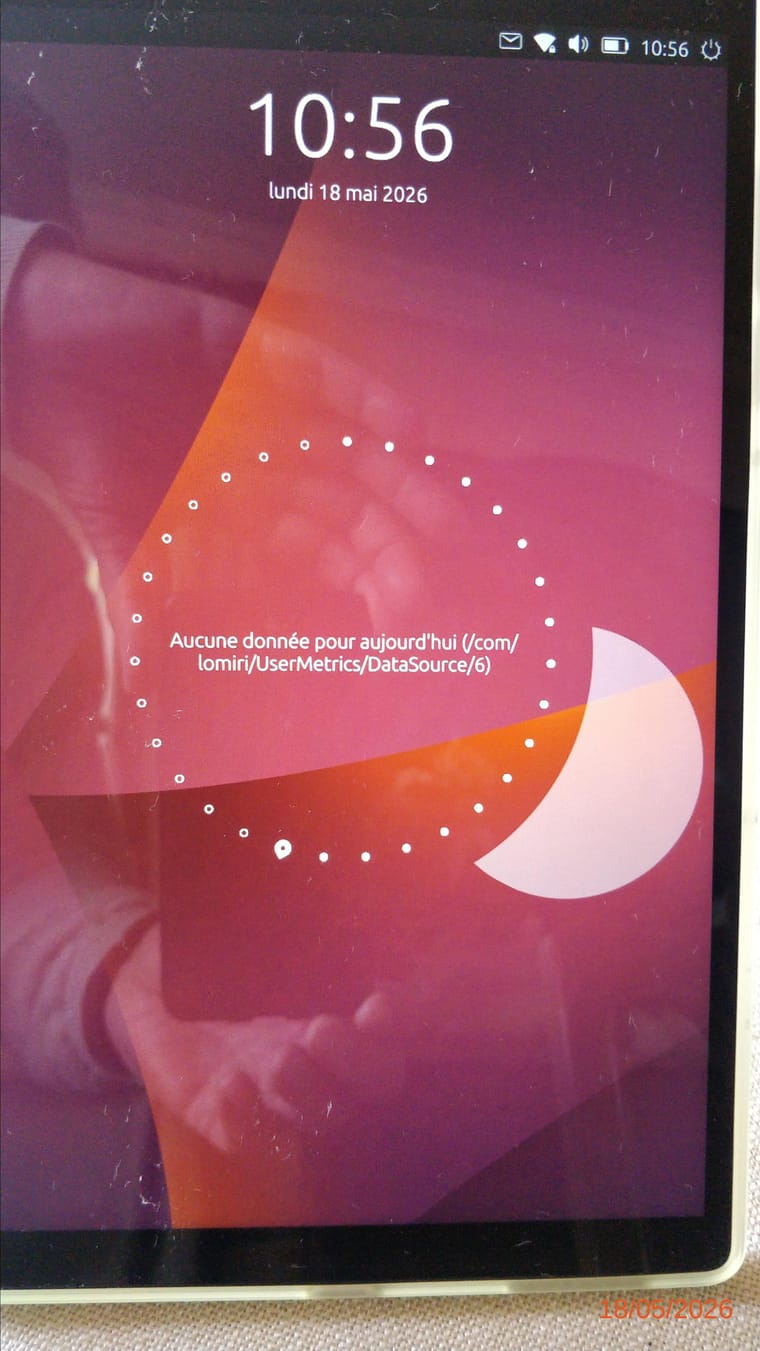
    Instead of ‘No video today’, the following text regularly appears after starting or restarting UT:
    "No data for today (/com/lomiri/UsersMetrics/DataSource/6)
    See photo.
    I tried to find the path indicated, but I couldn't find anything ...image20260518_105657998.jpg


    read more →
    @vince.vs said: I don't know how to use your information in a terminal; copy and past doesn’t work, copy & paste work in UT terminal, but it's a lot easier to connect to the phone with ssh when both the phone and a computer are connected with wifi.
  • J

    I am trying to open Webber shortcuts with Qt6-Morph by editing the Exec line of the .desktop file.

    I created a Webber short cut to Bluesky which can't be opened by classic Morph.

    The Exec part is

    Exec=aa-exec-click -p bsky-app-102d5057422da177.webber_bsky-app-102d5057422da177_1.0.0 -- webapp-container --webappUrlPatterns='https?://bsky.app/*,https?://*.bsky.app/*' --store-session-cookies --enable-media-hub-audio --enable-back-forward https://bsky.app/feeds


    The Exec part of Qt6 Morph itself is

    Exec=aa-exec-click -p morph-browser-qt6.ubports_morph-browser_1.99.4 -- wrapper ./morph-browser %u
    

    What needs to be replaced in the upper Exec with what from the lower Exec to make this work?


  • L

    Hello.

    I'm using the Sony Xperia X (F5121).
    UT 24.04-1.3

    I haven't been here in a while, and I notice the forum has changed a bit. I hope this is the right thread.
    I'd like to report the following issues since installing OTA 24.04-1. (These issues are still present in the current version 24.04-1.3.)

    1. Incorrect time zone when starting the device.
      The time is displayed incorrectly after booting up, regardless of whether the “automatic” or “manual” setting is enabled.
      It constantly displays UTC 0. However, my saved location is Berlin, which is UTC+1 and UTC+2 during daylight saving time.
      All I have to do is open “System Settings” and click on “Time and Date.” The time then corrects itself automatically.

    2. The camera app only works when I first launch it.
      When I launch the camera, everything works correctly at first. If I close the app and try to use it a second time later in the day, the screen remains black on the main camera.
      If I switch to the selfie camera, it works correctly. I can then switch back to the main camera, but the screen remains black. I have to restart the device for the main camera to work again.

    Thank you very much and best regards.


    read more →
    @los-tioz camera works fine on the latest RC. There's clock workaround: open Settings, then click on "Time & Date". "Set time and date" should be set to "automatically".
  • H

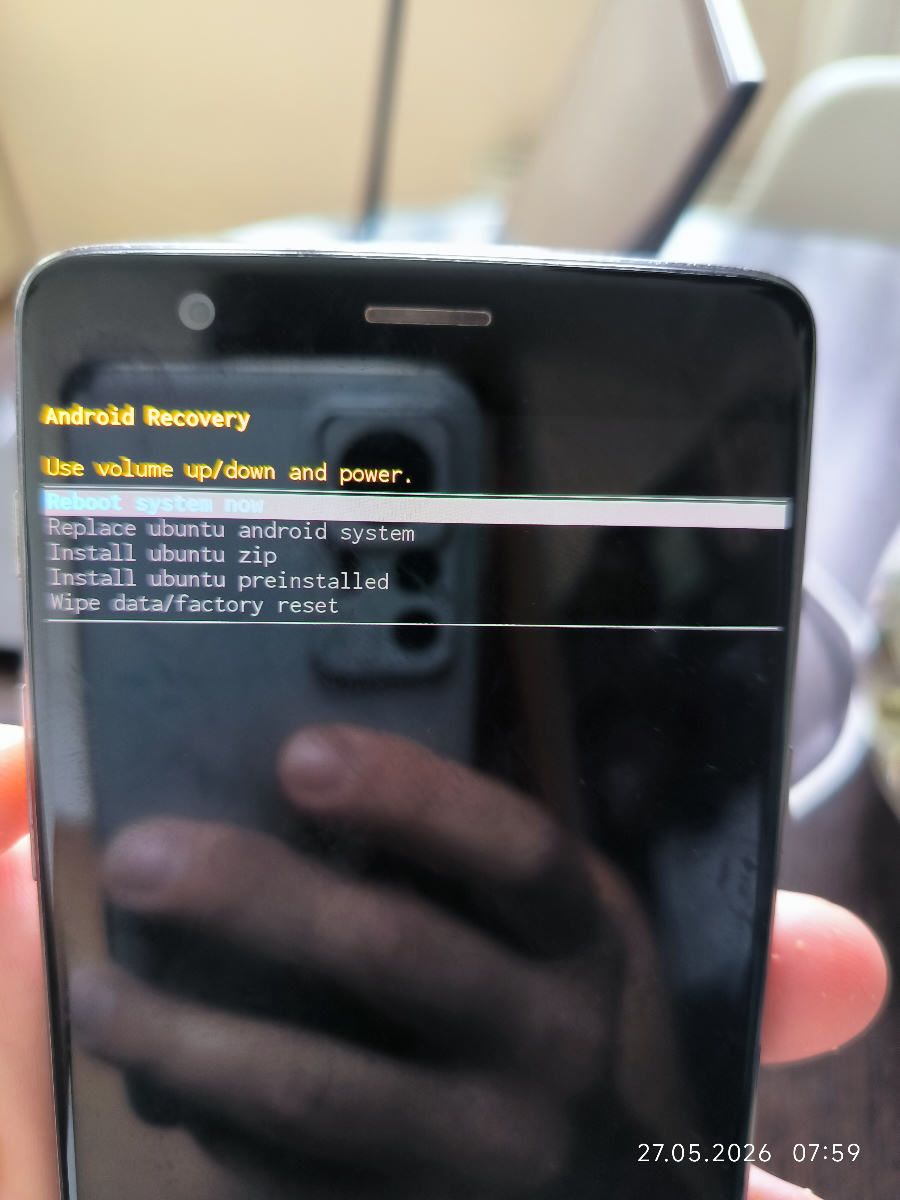
    Hi everyone. I'm having trouble installing Ubuntu Touch on my OnePlus 3T. I'm using the latest UBports installer on a Windows 10 laptop. ADB and fastboot work fine, and the bootloader is unlocked. The installer successfully flashed TWRP, and I followed all the instructions (wiped and verified the ext4 partitions). However, after rebooting, I got stuck here [укажите на фото/скриншот]. I also tried manually flashing TWRP via fastboot before running the installer, but the result is the same. What am I missing?

    1779862931896_resized.jpg


    For info, just installed it on OP3... Made sure the device was on Oxygen OS 9.0.6. unlocked the bootloader Booted to fastboot - then booted TWRP 3.7.0_9 Formatted DATA Wiped Cache, Dalvik/Cache, Storage and System Rebooted to Bootloader (fastboot mode) Used Installer 0.11.2 to test and started the install - device got picked up, no need to select Left "wipe data" unticked Followed instructions and UT installed as expected (Xenial).
  • H

    About once per second this message is logged to journalctl:
    Jul 02 13:12:01 ubuntu-phablet ofonod[4404]: Power request failed: OPERATION_NOT_ALLOWED

    The only google result for "ofonod" "Power request failed" "OPERATION_NOT_ALLOWED" is this thread about another Volla phone: https://forum.sailfishos.org/t/the-volla-x23-gx4-thread/15726/88. But it is not specifically about this issue, so I thought I'd create a new thread specifically for it.

    As far as I can tell this message is harmless: I can call the mobile number and the phone rings. I can call other numbers from this phone. I only wonder what it takes to get rid of this message - and does it indicate higher than intended power draw?

    When I run sudo systemctl stop ofono.service and sudo /usr/sbin/ofonod -P ril --nodetach --debug I see that the full message produced every second is

    ofonod[4404]: src/binder_radio.c:binder_radio_power_request_retry_cb() slot2
    slot2 < [000002e0] 24 setRadioPower
      0000: 61 6e 64 72 6f 69 64 2e  68 61 72 64 77 61 72 65    android. hardware
      0010: 2e 72 61 64 69 6f 40 31  2e 30 3a 3a 49 52 61 64    .radio@1 .0::IRad
      0020: 69 6f 00 00 e0 02 00 00  01 00 00 00                io...... ....
    slot2 > [000002e0] 23 setRadioPowerResponse OPERATION_NOT_ALLOWED
      0000: 61 6e 64 72 6f 69 64 2e  68 61 72 64 77 61 72 65    android. hardware
      0010: 2e 72 61 64 69 6f 40 31  2e 30 3a 3a 49 52 61 64    .radio@1 .0::IRad
      0020: 69 6f 52 65 73 70 6f 6e  73 65 00 00 85 2a 74 70    ioRespon se...*tp
      0030: 00 00 00 00 60 50 19 b1  7f 00 00 00 0c 00 00 00    ....`P.. ........
      0040: 00 00 00 00 00 00 00 00  00 00 00 00 00 00 00 00    ........ ........
      0050: 00 00 00 00                                         ....
    ofonod[4404]: Power request failed: OPERATION_NOT_ALLOWED
    ofonod[4404]: src/binder_radio.c:binder_radio_check_state() slot2 retry scheduled
    

    but likewise the only google result for "setRadioPowerResponse" "OPERATION_NOT_ALLOWED" is the android source code.

    What's next? Does this originate somewhere in the android driver stack? Could there be a way to allow this operation or might this be something the android driver generally does not allow and ofonod should be changed to stop retrying when OPERATION_NOT_ALLOWED is returned?


    read more →
    Looks like this is probably the fix? https://github.com/mer-hybris/ofono-binder-plugin/pull/53
  • flohackF

    Hi there,

    if you ever want to install an Android-based distro after Ubuntu Touch was installed, you will notice that no sensors work anymore. The root cause was already identified by guys on the Fairphone forum some time ago description is more to the end of the thread, so be patient and read it in full - but here in UT side nobody of course noticed that, as sensors keep working correctly in UT 🙂

    What happens is that the necessary Android selinux contexts are being somehow removed from the sensor folder in the persist partition. We would need to analyze why this happens, but probably the files are being rewritten from the Android container in UT and as UT does not use selinux, they are set to unlabeled, like so:

    ./sensors/registry/registry:
    total 668
    drwxr-xr-x 2 system system u:object_r:vendor_persist_sensors_file:s0  12288 2023-11-21 22:10 .
    drwxr-xr-x 3 system system u:object_r:vendor_persist_sensors_file:s0   4096 2023-11-21 22:10 ..
    -rw------- 1 system system u:object_r:unlabeled:s0                       78 2023-11-21 22:10 ak0991x_0
    -rw------- 1 system system u:object_r:unlabeled:s0                      131 2023-11-21 22:10 ak0991x_0.mag
    -rw------- 1 system system u:object_r:unlabeled:s0                      233 2023-11-21 22:10 ak0991x_0.mag.config
    -rw------- 1 system system u:object_r:unlabeled:s0                      181 2023-11-21 22:10 ak0991x_0.mag.config_2
    -rw------- 1 system system u:object_r:unlabeled:s0                      222 2023-11-21 22:10 ak0991x_0_platform
    -rw------- 1 system system u:object_r:unlabeled:s0                      866 2023-11-21 22:10 ak0991x_0_platform.config
    -rw------- 1 system system u:object_r:unlabeled:s0                      142 2023-11-21 22:10 ak0991x_0_platform.mag
    -rw------- 1 system system u:object_r:unlabeled:s0                      146 2023-11-21 22:10 ak0991x_0_platform.mag.fac_cal
    -rw------- 1 system system u:object_r:unlabeled:s0                      204 2023-11-21 22:10 ak0991x_0_platform.mag.fac_cal.bias
    -rw------- 1 system system u:object_r:unlabeled:s0                      508 2023-11-21 22:10 ak0991x_0_platform.mag.fac_cal.corr_mat
    -rw------- 1 system system u:object_r:unlabeled:s0                      148 2023-11-21 22:10 ak0991x_0_platform.mag.fac_cal_2
    -rw------- 1 system system u:object_r:unlabeled:s0                      206 2023-11-21 22:10 ak0991x_0_platform.mag.fac_cal_2.bias
    -rw------- 1 system system u:object_r:unlabeled:s0                      510 2023-11-21 22:10 ak0991x_0_platform.mag.fac_cal_2.corr_mat
    -rw------- 1 system system u:object_r:unlabeled:s0                      176 2023-11-21 22:10 ak0991x_0_platform.orient
    -rw------- 1 system system u:object_r:unlabeled:s0                      622 2023-11-21 22:10 ak0991x_0_platform.placement
    

    Unfortunately the solution to this is, as described in the Fairphone forum thread, a bit cumbersome:

    • The bootloader needs to be unlocked. If you happen to have all your data already in this Android installation and you have locked the bootloader again, you will loose all your data during this process.
    • You have to install Magisk. Depending on the Android version this involves patching the boot.img file or creating a custom recovery
    • With Magisk you can obtain a root shell and the execute the necessary restorecon command

    It would be awesome to find out if we can avoid this situation somehow. Unfortunately I just dont have the time for the moment, but I can confirm the fix worked as described over there.

    BR Florian


    I had to install back a second time Android on my Fairphone 4, this time I've took some notes shared below. TLDR: LineageOS developer options pane allows you to enable Rooted debugging. This allows you to use the adb root command which start a rooted debugging session. Then you can use adb shell to open a console on the device and run restorecon -FR /mnt/vendor/persist to restore the SELinux permissions. From Ubuntu Touch, the easiest way to go to the fastboot mode, is to open the terminal application and run: sudo reboot -f bootloader Then, I used the Android 11 factory reset image provided by Fairphone (but don't do like me, see below). Then, I wanted to install LineageOS and they require to have Android 13/15. So, I opened Android 11, go to phone information in the settings application, repeatedly touch the build number until the developer mode is enabled. Go, to the system panel in the settings application, open the developer mode and enable the ADB debugging. On my computer, I go back to the fastboot mode with: adb reboot bootloader I've installed Android 13 factory reset image provided by Fairphone as I already have downloaded it for another experiment. Then I boot Android 13 and enabled usb debugging with same steps than Android 11 (see above). Then I've followed LineageOS instructions to install it step by step: https://wiki.lineageos.org/devices/FP4/install/ Then, with LineageOS, you can enable developer options with same procedure. The LineageOS developer options have two options: USB debugging and Rooted debugging, you need the last one to be able to run commands to reset correctly permissions on the hardware drivers. Then, on my computer I was able to run, adb root to start rooted debugging, open a shell on the phone with adb shell and run in this shell restorecon -FR /mnt/vendor/persist: $ adb root restarting adbd as root $ adb shell FP4:/ # restorecon -FR /mnt/vendor/persist SELinux: Loaded file context from: /system/etc/selinux/plat_file_contexts /system_ext/etc/selinux/system_ext_file_contexts /product/etc/selinux/product_file_contexts /vendor/etc/selinux/vendor_file_contexts /odm/etc/selinux/odm_file_contexts FP4:/ # Then you need to reboot and you can check this worked by enabling the automatic rotation feature: open an application and rotate your phone, the application should follow the movement
  • K

    This is kind of an update on this post. It's been a year and I've kind of improved and stabilized the tool (Jerk Installer and Jerk Packages) I created, or I'd like to think that 😆 Well, I do use it on basically all my devices so I guess it's proven now?


    Most importantly, I've streamlined the hacks/packages that I've been developing and maintaining. I've combined them per component and just added settings so you can customize which things you want enabled or disabled. The main 2 ones are the following.

    Malakiboard

    • A collection of hacks for UT's onscreen keyboard.
    • Notable new features and functions are custom keyboard height, floating mode, custom theme, and theme that follows system theme.

    Lomiri Plus

    • A collection of hacks for Lomiri, UT's desktop environment.
    • Notable new features and functions are notch and rounded corners fix, manual rotation button, and so much more to mention and hard to explain too 😄

    IMPORTANT NOTES!

    • DANGER!: This tool can be dangerous to your system. It can render your device unusable, though it has never happened to me yet and only during development 😄. You can always reflash with the installer to reset the whole system and just make sure to NOT select the Wipe option.
    • BE SAFE!: I haven't found a way to automatically create the packages so you'll have to create them manually. I highly discourage downloading and installing pre-created packages from anyone, even from me! although I do that in Telegram LOL. It's easy to manipulate the contents so it's better to be safe. As always, it's best to download from the original source.
    • BE RESPONSIBLE!: To avoid creating unnecessary logged issues on the official UBports repos, make sure to reset your system first and reconfirm the bug you're encountering before filling them in Gitlab/Github. Resetting is easy. You can even reset all with the command jerk reset all
    • HAVE FUN!: Enjoy all my crazy experiments, ideas, concepts, whatever they are. Let me know if you have comments or any feedback about them. The hope is to have some of them implemented officially 😄

    read more →
    @domubpkm The app itself would be doable but the packages aren't doable since they ust replace system files so translations can't be processed. I mean it's doable but it'll take for someone to modify each file manually and create separate packages per language
  • H

    I'm trying to update to UT 24.04-1.3, but the updater only reboots to recovery where I can only do the usual 'Factory Reset' or other advanced options, and nothing is installed.

    Am I supposed to do a factory reset to trigger the update or am I missing something?

    PS: the device is the Lenovo M10 tablet.


    read more →
    @gpatel-fr Weirdly that does work somewhat, but the process seems to be rather convoluted. Rebooting to the bootloader/fastboot from the adb shell allows the installer to detect the device, but while installing it eventually reboots to recovery and shows a 'failed installation message (error 256)', and then it auto-reboots into the 'System Updater' screen you'd expect from an OTA update. So something about the installer 'unblocked' my previous update attempts (?).
  • S

    So I have tried this a few times now and the UBPorts Installer always seems to install fine, but it goes to a boot loop with the Lenovo logo. It will stay like this forever if I let it. I've let it go for a day, 2 days. The installer doesn't give me an error, I've left it to charge and not touched it, I'm kind of at a loss now and thinking I either have to get a Pinetab or give up on this. Can anyone help me?


    @MrT10001 I reran the installer three times. It didn't work. So the third time I used this guide. And it worked! You're awesome man! Thanks!
  • libremaxL

    A YouTube video showcasing the Zinwa Q25 running UbuntuTouch: https://share.google/5Mg9heg3wH43SSt2W

    The Zinwa Q25 uses the casing, screen and keyboard of an original BlackBerry Classic Q20, but with an updated motherboard featuring the processor (MTK G99), 12 GB of RAM, 256 GB of storage, LTE/VoLTE connectivity and new cameras.

    Porting is well underway on the UBports website and is being handled by two well-known contributors to the community:
    https://gitlab.com/groups/ubports/porti … -/activity

    The Zinwa Q25 is included in the list of devices for which a preliminary version of UT 26.04-1.x is available:
    https://forums.ubports.com/topic/12312/looking-for-testers-ubuntu-touch-26.04-1.x-early-version

    Find out more about the Zinwa Q25’s specifications: https://zinwa.cn/

    That Q25 with Ubuntu Touch really looks tempting!


  • UBportsNewsU

    Today is Ubuntu Touch Q&A Day

    Ubuntu Touch Q&A191 is today at 19:00 UTC please join us on our YouTube channel: https://www.youtube.com/watch?v=hS6sOkNhX1s

    Questions can be posted during the show or for priority using this link: https://forums.ubports.com/topic/12300/ubuntu-touch-q-a-191-call-for-questions

    UBports@telegram
    #ubports:matrix.org

    #UBports #UbuntuTouch #UBportsQandA #Lomiri #OTA12 #Ubuntu #UTnoble #MobileLinux


  • D

    I finally got my cursed purchase of a cheap OnePlus N100 from Amazon to boot Ubuntu Touch, and I wanted to share the process I needed to go through to get it to work so that others might have faster success where it took me ages.

    I bought this phone from Amazon thinking N100 is well supported by Ubuntu Touch so it was a safe bet. Little did I know, the Metro version is a cursed bastard of a phone and by "Unlocked" they mean carrier unlocked so you can activate on other carriers, but the bootloaders on these damn things are locked and unlocking them is cursed. The boot loader was still locked and the "OEM Unlock" option was greyed out. It had MetroPCS unlocking software on it, but that unlocking software just threw an error when I tried to run it and would not function. I tried updating the OS a few times.. nothing. I tried downgrading and nothing. I tried my real phone's sim card to get it mobile data access, but nothing. I tried getting support from the Metro people a few times but they were ultimately useless. By the time I had given up on them, my return window was closed so I was on my own.

    Phase 1: Unlocking the Bootloader (Possibly optional):

    I tried the oneplus/t-mobile unlock site
    https://www.oneplus.com/us/unlock_token but it responded with
    "IMEI number has been applied, please check your application records."
    which apparently means that someone else generated an unlock code already but since it wasn't me I didn't have it and couldn't get it. I ended up engaging OnePlus support through their "Send us an Email" form on their web site and they came through for me.

    https://oneplus.custhelp.com/app/ask?&country=us

    I had to give them the serial number, imei number and pcba number, and I included the output of "fastboot oem get_unlock_data". Within a few hours I had an unlock code. Lets go OnePlus! Nice job!

    Through this whole ordeal, I had been reflashing to OnePlus_Nord_N100_Metro-by-T-Mobile_OxygenOS_10.5.8 using EDL mode to see if I could OEM Unlock from a fresh state, but it wouldn't work. I tried updating to the latest OS and it still wouldn't work. Once I got the unlock code in email and unlocked using "fastboot flash unlock <filename.bin>" I booted up and finally got the OEM Unlocking option to be not greyed out and rebooted into fastboot mode and disabled the bootloader lock "fastboot oem unlock" which factory reset, booted up went through the startup questions again, enabled adb and started the UBports Installer and SUCCESS! Except no.

    After this, I could get to the UBports fastboot/recovery program, but the machine would not boot. It simply stayed at the "this device is unlocked and can't be trusted" google message and never went past that. As it turns out, I may have been moments from having a working install at this point but I didn't know what to do so there were many many more hours of work ahead of me. I assumed that my problem was that I was running Metro firmware with OxygenOS 10.5.8, not one of the two supported firmwares (Global 10.5.3 or EU 10.5.2) Onward to phase 2.

    Crossflashing to other firmwares:

    For those who don't know, if you hold down both volume buttons at boot and go into EDM mode for 10 seconds where you can run the MSMDownloadTool and push a very complete set of ROM data to the phone. You can find various versions of this to unbrick OnePlus phones this way but the N100 has (at least) 3 versions of the phone which won't install each other's firmware. Each phone has a project code associated with it and the MDM tool will only flash firmware that matches that project code. The MetroPCS phone's code is 20880. The uk model is 20883. The Global model is 20881. The interesting thing is there is python software (oppo_decrypt) out there that lets you extract the firmware bundle in the .ops file, change the settings.xml and generate a new .ops file with the same firmware but with different project codes. You can get MSMDownloadTool to upload a different model's firmware to a BE2015 Metro N100 by extracting that phone's .ops file and then changing these settings in the settings.xml to match this phone:
    Project="20880"
    Version="bengal_14_O.04_201221"
    ModelVerifyPrjName="6ccf5913"
    ModelVerifyRandom="0S5ul8diroerEa2h"
    ModelVerifyHashToken="61D90BD1E63098DEF7424C5FF14EBF097AE1802709F585F05670B2B7B02B31E7"

    I'm not sure if all of them need to be changed, but those are the only changes I made and the new .ops file worked. I changed the settings.xml, ran "python3 oppo_decrypt\opscrypto.py encrypt <directory>" and it generated a new .ops file based on the contents of the extract folder and poof! I had a MSM download tool that would crossflash my stupid cursed Metro N100 to be a normal N100. Unfortunately, this didn't solve my problem at all. Interestingly though, this may have let me unlock the firmware without talking to OnePlus support, since the non-metro firmwares don't have the same OEM unlocking restriction. I'm unfamiliar with all the details of how that bootloader unlocking works though so I don't know, I may have still needed to get a .bin file from OnePlus. This may have been a complete waste of time, but I'm putting it here since I find it interesting that it was even possible and it was part of my process for getting to the end.

    As I said though, it didn't work. I ran through the same process of enabling oem unlocking, unlocking the bootloader which kicked off a factory reset, enabling adb again, and running through the UBports installer, getting SUCCESS, but no I was stuck at the same place where it would boot and hang. I could get into the UBPorts fastboot/recovery tool and I could enable adb, open an adb shell and mount the /system partition and I messed around on the command line and found out the data partition was completely empty. This is where the real OS is supposed to live but nothing was there. After some AFK time thinking I realized that it might just be something dumb like a partition size mismatch and I re-ran the UBPorts installer with the phone in the UBPorts fastboot mode and unselected the option to redo partitioning. IT WORKED! I get the cool UBPorts robot telling me it's installing updates and my new Ubuntu Touch device was soon up and running.

    Now.. I suspect I could have done that about 2 days of work earlier when I first got the UBports recovery installed, but I can't go back in time to know. I'm documenting all of this just in case it helps someone else on their journey though this messed up process of cracking these things open and making them do what we want.


    read more →
    Your BE2015 install path was useful prior art for cracking the BE2012 (T-Mobile US, not Metro) variant — same chipset, slightly different blockers. Sharing in the spirit of reciprocity. Full BE2012 installer up at https://github.com/dcherrera/n100-be2012-crossflash. macOS-native EDL flash (no MSMDownloadTool needed), plus a small binary patch to /usr/sbin/ofonod that fixes a SIM-init blocker which leaves Modem.Features stuck at ['sim'] on first boot — same modem firmware family, may be relevant to BE2015 users on certain SIMs too. README has the offset table if anyone wants to verify against their build. Also confirms your "T-Mobile SIM works, Verizon SIM doesn't" observation on the BE82CB modem firmware — same outcome on our end, since the modem firmware is T-Mobile-band tuned.
  • R

    Hi, I am trying to use ubports app in Ubuntu to install Ubuntu touch on OnePlus Nord 100 (BE2012) but the installer says:

    Device Not Supported.

    your device: OnePlusN100TMO

    Is this a bug or a legitimate issue? Is there any other way to install on this device?

    Thanks,
    Rahul


    I successfully flashed ubuntu touch on it. I bought this model not knowing it wouldn't work. So I spent a few day putting together a work around because honestly it just sounded like a fun challenge. You can look through my findings here. https://github.com/dcherrera/n100-be2012-crossflash. Just a heads up, you should be able to clone this and claude code should be able to orient itself and help you get it done. i tried very hard to make sure the documentation was complete.
  • Linus67L

    I plan to flash a Lenovo Tab M10 HD 2nd Gen LTE 4G/64GB (X306X) with Ubuntu Touch in the next few days.
    Later on, I might replace the battery with a new one.
    Could there be any issues with replacing the battery while running the Ubuntu Touch OS? Or should I replace the battery while it’s still running stock Android 11?


    @MrT10001 Getting stock Android 11 onto the Lenovo Tab was a real challenge yesterday. Problems: SPflashtool failed due to chip permissions. Attempts using MTK bypass tools also failed How it filaly worked (after ~3 houres) Download Lenovo Software Fix Tool (thanks for the tip) Create a Lenovo account (using a disposable email address) Start the recovery workaround (but you can only flash up to Android 10 !!!!) OK, perform a recovery with Android 10 The recovery tool downloads the ROM (A 11) to your PC Before starting the recovery, you must replace the downloaded Android 10 files with the Android 11 files witch you downloaded from the UBports link bevor. Then start the recovery process and the Lenovo Software Fix Tool will flash the tablet with Android 11, which you’ve placed in its nest, just like a cuckoo’s egg. Translated with DeepL.com (free version)
  • W

    lomiri-location-service GPS reliability patches (navius branch, v3.4.1+navius5)

    While building Navius (a GPS navigator for Ubuntu Touch) I ran into several GPS reliability issues in lomiri-location-service, particularly on devices that run Waydroid alongside UT.

    I have collected the fixes in a branch called navius (currently at navius5). All patches are tested on a Xiaomi Redmi Note 9 Pro (HALIUM_10, arm64) running Ubuntu Touch Noble (24.04), but they address generic race conditions and watchdog issues that should benefit any device.

    I would like to share them here and eventually propose the relevant ones upstream.


    Bugs fixed

    1. Waydroid GPS callback race → SIGSEGV navius1

    On HALIUM_10, Waydroid and Ubuntu Touch both access the GPS HAL via host_hwbinder. Waydroid can call register_callbacks() at any time; that function does u_hardware_gps_delete() + u_hardware_gps_new(). If a GPS callback fires between those two calls it dereferences the freed handle — SIGSEGV, daemon crash.

    Fix: std::shared_mutex callback_mutex in Impl. All seven GPS callbacks hold a shared lock (run concurrently with each other). register_callbacks() holds an exclusive lock only while deleting/installing the handle — callbacks complete first, then the swap happens safely.

    2. EDEADLK at service start navius1

    The initial mutex fix held the exclusive lock across the whole delete → new sequence. u_hardware_gps_new() fires on_set_capabilities synchronously on the calling thread, which tries to take a shared lock on the same mutex: EDEADLK, daemon aborts at start-up.

    Fix: Three-phase lock:

    1. Exclusive lock → delete old handle → release.
    2. Create new handle without any lock (re-entrant callbacks are now safe).
    3. Exclusive lock → install new handle → dispatch position mode → release.

    3. start_positioning() blocking the daemon forever navius2

    start_positioning() was called from a D-Bus handler thread. Its internal QEventLoop blocked that thread indefinitely. LLS started, satellites were tracked, but no position fix ever arrived.

    Fix: start_positioning() dispatched to the main thread via Qt::QueuedConnection / QMetaObject::invokeMethod.

    4. GPS stops after Waydroid closes and never restarts navius4

    When Waydroid shuts down it calls u_hardware_gps_stop() on the shared HAL, halting GPS globally. LLS's handle remained valid so it never detected the stall — GPS frozen until LLS was manually restarted.

    Fix — watchdog thread: a detached thread ticks every 5 s and reads last_gps_ms (updated by on_location_update and on_sv_status_update). If no GPS data for 10 s, it re-runs register_callbacks() and restarts the chipset automatically.

    5. No fixes despite 37+ satellites in view navius4

    dispatch_updated_modes_to_driver() (which sends the position mode to the chipset via u_hardware_gps_set_position_mode()) was called in register_callbacks() but not in the fast path inside start_positioning(). The chipset tracked satellites but never computed fixes.

    Fix: call dispatch_updated_modes_to_driver() before u_hardware_gps_start() in the fast path.

    Result after navius4: Waydroid and Ubuntu Touch GPS now work simultaneously. After Waydroid opens and steals the HAL, the watchdog reclaims callbacks within 10 s; accuracy converges to ~4 m while Waydroid keeps positioning.


    Feature additions

    GetVisibleSpaceVehicles D-Bus method navius2

    QML clients that cannot subscribe to D-Bus property-change signals have no way to get a satellite snapshot without keeping a persistent session. Added a synchronous method and read-only property VisibleSpaceVehicles to the service interface:

    dbus-send --system --dest=com.lomiri.location.Service \
              --print-reply \
              /com/lomiri/location/Service \
              com.lomiri.location.Service.Interface.GetVisibleSpaceVehicles
    

    Compile-time debug traces (LLS_DEBUG) navius5

    All GPS trace logging is gated behind LLS_DEBUG (default false) in include/…/lls_trace.h. Zero runtime cost when disabled; set to true and rebuild for full per-fix traces in journald.


    Build & install

    The branch ships a build-deb.sh script that produces a .deb inside an isolated Docker container (Ubuntu 24.04 + UBports repo). No host modifications needed. Requires Docker on an ARM64 host.

    git clone https://github.com/woodyst/lomiri-location-service -b navius
    cd lomiri-location-service
    bash build-deb.sh            # output to ./debs/
    
    # Deploy to device
    scp debs/liblomiri-location-service3_*_arm64.deb phablet@<device>:/tmp/
    ssh root@<device> "mount -o remount,rw / && \
        dpkg -i /tmp/liblomiri-location-service3_*_arm64.deb && \
        systemctl restart lomiri-location-service"
    

    Upstream proposal

    I intend to open two MRs on gitlab.com/ubports/…/lomiri-location-service:

    MR What Status
    MR 1 Bug fix: mutex/EDEADLK race in register_callbacks() Ready to propose
    MR 2 Feature: GetVisibleSpaceVehicles D-Bus method Ready, needs API discussion
    Watchdog thread, LLS_DEBUG, build script Navius-specific; not proposing upstream

    Before opening the MRs I wanted to share the work here and get feedback, especially on whether there is already upstream work addressing the Waydroid race condition or the GetVisibleSpaceVehicles API.

    Any review or testing on other devices is very welcome. Full patch documentation: doc/navius-patches.md.


    @projectmoon A GPS Navigator. I was a lot of time searching for a GPS navigator with the functionality I like for me, but I didn't found anyone. So I decided to code my own. I'm reviewing it now for publishing it.
  • Sota4Ever_kS

    Although that device was already working, I would like to mention it

    My Phone

    Samsung Galaxy S20 FE

    Affairs

    It still lacks some things and I don't know if it will work with the other firmware of this device.
    If you would be happy to help me, I am still a novice at this.

    Link

    https://github.com/Sota4Ever/UT-Port-samsung-S20FE/tree/halium-13-r8s


    Hi guys, I'm truying to build Sota4ever_k repository for a Samsung Galaxy S20 FE (r8s, SM-G780F/DS, with Exynos) Is it still usable? Right now, it fails with lot of warning in openssl + make O=/home/vincent/dev/git/UTFamily-Samsung-Exynos9830/workdir/downloads/KERNEL_OBJ CC=clang -j16 scripts/kconfig/conf -s --syncconfig Kconfig /home/vincent/dev/git/UTFamily-Samsung-Exynos9830/workdir/downloads/linux-android-samsung-exynos990/scripts/extract-cert.c: In function ‘display_openssl_errors’: /home/vincent/dev/git/UTFamily-Samsung-Exynos9830/workdir/downloads/linux-android-samsung-exynos990/scripts/extract-cert.c:46:9: warning: ‘ERR_get_error_line’ is deprecated: Since OpenSSL 3.0 [-Wdeprecated-declarations] 46 | while ((e = ERR_get_error_line(&file, &line))) { | ^~~~~ In file included from /home/vincent/dev/git/UTFamily-Samsung-Exynos9830/workdir/downloads/linux-android-samsung-exynos990/scripts/extract-cert.c:23: /usr/include/openssl/err.h:426:15: note: declared here 426 | unsigned long ERR_get_error_line(const char **file, int *line); ......... lot of warning, and then..... 1 warning generated. /home/vincent/dev/git/UTFamily-Samsung-Exynos9830/workdir/downloads/linux-android-samsung-exynos990/drivers/video/fbdev/exynos/panel/sysfs.c:2358:21: warning: unused variable 'panel_data' [-Wunused-variable] struct panel_info *panel_data = &panel->panel_data; ^ 1 warning generated. /home/vincent/dev/git/UTFamily-Samsung-Exynos9830/workdir/downloads/linux-android-samsung-exynos990/drivers/video/fbdev/exynos/dpu30/decon_core.c:1200:38: error: use of undeclared identifier 'prev_state' decon_doze_first_frame_black(decon, prev_state, next_state); ^ 1 error generated. make[6]: *** [/home/vincent/dev/git/UTFamily-Samsung-Exynos9830/workdir/downloads/linux-android-samsung-exynos990/scripts/Makefile.build:333: drivers/video/fbdev/exynos/dpu30/decon_core.o] Error 1 make[6]: *** Attente des tâches non terminées.... make[5]: *** [/home/vincent/dev/git/UTFamily-Samsung-Exynos9830/workdir/downloads/linux-android-samsung-exynos990/scripts/Makefile.build:638: drivers/video/fbdev/exynos/dpu30] Error 2 make[4]: *** [/home/vincent/dev/git/UTFamily-Samsung-Exynos9830/workdir/downloads/linux-android-samsung-exynos990/scripts/Makefile.build:638: drivers/video/fbdev/exynos] Error 2 make[3]: *** [/home/vincent/dev/git/UTFamily-Samsung-Exynos9830/workdir/downloads/linux-android-samsung-exynos990/scripts/Makefile.build:638: drivers/video/fbdev] Error 2 make[2]: *** [/home/vincent/dev/git/UTFamily-Samsung-Exynos9830/workdir/downloads/linux-android-samsung-exynos990/scripts/Makefile.build:638: drivers/video] Error 2 make[2]: *** Attente des tâches non terminées.... make[1]: *** [/home/vincent/dev/git/UTFamily-Samsung-Exynos9830/workdir/downloads/linux-android-samsung-exynos990/Makefile:1144: drivers] Error 2 make: *** [Makefile:146: sub-make] Error 2 What can I do?
  • K

    Re: Ubuntu Touch Installation Guide for Xiaomi POCO X3 NFC / X3

    For those looking to use a Poco X3, it is now much more difficult to unlock the bootloader, especially on MIUI 14.

    To unlock the bootloader, you MUST:

    • have a China region Xiaomi account (if yours is global, you need a new account)
    • have a SIM card in the phone
    • link your phone to the account and add the phone number (SMS verification often fails)
    • request unlock authorization at midnight China time (limited to 2000 requests worldwide daily)

    All known methods to bypass the 7 day waiting period still need a code that is generated server-side only after linking a phone number. A phone number can only be added to your Xiaomi account if your region is set to China. And you cannot change the region of an existing account. While you can use a phone number from any country, the account region must be set to China.

    Information is Xiaomi community is outdated and unlikely to be updated.
    Xiaomi is making it more difficult to unlock bootloaders across all models, but has not yet explicitly banned unlocking. They have also instructed their service centers not to unlock bootloaders for any reason other than when necessary for repair, and to ensure they are re-locked when returning the device to its owner.


    30 days passed and the Xiaomi community app says: "Application quota limit reached, please try again after 05/30 (mm/dd) 00:00 (GMT+8)" I though other people reported this message in MiUnlock app. I guess I have to be granted through the Community app and then do the unlocking job connecting the phone to the PC's MiUnlock app.