World

Topics from outside of this forum. Views and opinions represented here may not reflect those of this forum and its members.

A world of content at your fingertips…

Think of this as your global discovery feed. It brings together interesting discussions from across the web and other communities, all in one place.

While you can browse what's trending now, the best way to use this feed is to make it your own. By creating an account, you can follow specific creators and topics to filter out the noise and see only what matters to you.

Ready to dive in? Create an account to start following others, get notified when people reply to you, and save your favorite finds.

Register Login
  • peat_psuwitP

    Hello everyone.

    We are pleased to announce that Ubuntu Touch 24.04-2.0 Beta is now available for testing! Ubuntu Touch 24.04-2.0 is slated for release on 13 July 2026. Before then, we need to make sure it's ready to go.

    Notable features in this release are:

    • Updated browser engine for Morph Browser
    • Ubuntu Touch can now avoid notches and rounded corners
    • Screenshot editor

    More info about these features are available on our blog.

    Unfortunately, because of the system storage space limitation, we're unable to provide Ubuntu Touch 24.04-2.0 to all of currently supported devices. We have divided devices into 3 groups:

    1. Devices we're confident will not have a problem with system storage space (or have the problem resolved). These devices are:
    • F(x)tec Pro1X
    • Fairphone 4
    • Fairphone 5
    • Lenovo Tab M10 HD 2nd Gen WiFi / LTE
    • Nothing Phone (1)
    • Sony Xperia X
    • Volla Phone
    • Volla Phone X
    • Volla Phone 22
    • Volla Phone X23
    • Volla Phone Quintus
    • Volla Phone Plinius
    • Volla Tablet
    • Rabbit R1
    • Xiaomi Poco X3
    • Zinwa Q25

    To receive Ubuntu Touch 24.04-2.0 Beta on these devices, switch your device to Release Candidate channel, then run the following command in Terminal app or via ADB/SSH:

    gsettings set io.ubuntu-touch.system-settings.update offer-development-release true
    

    Afterwards, head to System Settings -> Updates, and you should be offered to upgrade to Ubuntu Touch 24.04-2.0 Beta.

    1. Devices that are known not to work. These devices are:
    • Oneplus Nord N10 5G
    • OnePlus Nord N100
    • OnePlus 5
    • OnePlus 5T
    • OnePlus 6
    • OnePlus 6T
    • Fairphone 3 and 3+
    • Google Pixel 3a and 3a XL
    • Xiaomi Poco M2 Pro
    • Xiaomi Redmi Note 9 Pro (Global)
    • Xiaomi Redmi Note 9S/9 Pro (India)
    • Xiaomi Redmi Note 9 Pro Max

    For these devices, we've stopped updates flowing into the daily channel to avoid bricking those devices. If you follow the above instructions while you're on 24.04-1.x Release Candidate channel, you won't be offered to upgrade to 24.04-2.x Beta. However, if you're on 24.04-1.x Daily channel, you may still be offered to upgrade to 24.04-2.x daily images. Do not upgrade, as 1.) this is the older image before we include the new Qt 6-based Morph Browser, and 2.) you will not be able to upgrade to the new daily image once it's available.

    If your devices are in this list and you're already on 24.04-2.x Daily channel, I recommends you to use UBports Installer to downgrade to 24.04-1.x images and wait for your port to receive 24.04-2.x updates again. This can be done without losing data.

    1. Devices that are not in either of the list above. We don't have enough information to determine if they'll work on 24.04-2.x, so we need testing from you. To do so, make sure you're on a spare device, then follow the same instructions above but switch to Daily channel instead of Release Candidate channel. The possible results are:
    • Your device upgrade successfully. In such case, congratulations, your device should be working with 24.04-2.x. Please report back to us, and we'll enable your device to receive 24.04-2.0 RC and 24.04-2.0, or if not possible in time, for 24.04-2.1 or subsequent releases.
    • Your device fails to upgrade. In such case, please use UBports Installer to restore 24.04-1.x on your device, and then also report to us to disable updates to these devices too.

    I know that these instructions are long and unwieldy, but this is due to the special transition that needs to happen for the inclusion of Qt 6-based Morph Browser with upgraded Chromium. We truly appreciate all testing. Please don't hesitate to reply below with any questions you have.



    read more →
    @lsitongia not sure what you are searching for, if you are under 24.04-2.0 morph is using qt6. Try which morph-browser should return /usr/bin/morph-browser then ldd /usr/bin/morph-browser | grep -i libqt should return a bunch of linkings to qt6 libraries.
  • P

    Hello

    I'm trying to revive the 'ubtd' app (Bluetooth file transfer) initially written by Michael Zanetti and Ian L., but I've hit a roadblock and I could use some guidance.

    I'm currently targetting UT 20.04 on a Pixel 3a.

    By default, the OBEX daemon doesn't run on the phone. A 'systemd' unit file is supposed to start it (/usr/lib/systemd/user/dbus-org.bluez.obex.service), but it is reported as "loaded / inactive (dead)" by 'systemctl' -- I'm not sure why as I was unable to find relevant log entries.

    I can manually start the OBEX daemon using the following command:

    $ systemctl --user start obex.service
    

    In this case, the 'obexd' daemon keeps running and uses the same command-line parameters as those specified for the D-Bus related service (obexd -P ftp,irmc,mas,pcsuite -r /home/phablet).

    Nonetheless, after pairing the phone with my laptop, when I start my app (the one that is supposed to receive incoming file transfers), I see the following messages in its log:

    [03/01/2026 12:25] creating agent on dbus
    [03/01/2026 12:25] registering agent
    [03/01/2026 12:25] registering agent on obexd-server
    [03/01/2026 12:25] Error registering agent for the default adapter: QDBusError("org.freedesktop.DBus.Error.ServiceUnknown", "The name org.bluez.obex was not provided by any .service files")
    

    For information, the obex.service unit file does expose "org.bluez.obex" as BusName, not as Name -- not sure how relevant that is.

    On its side, the OBEX daemon logs the following:

    [03/01/2026 12:25] CONNECT(0x0), <unknown>(0xff)
    [03/01/2026 12:25] CONNECT(0x0), <unknown>(0x0)
    [03/01/2026 12:25] PUT(0x2), <unknown>(0xff)
    [03/01/2026 12:25] PUT(0x2), Forbidden(0x43)
    [03/01/2026 12:25] DISCONNECT(0x1), <unknown>(0xff)
    [03/01/2026 12:25] DISCONNECT(0x1), Success(0x20)
    [03/01/2026 12:25] disconnected: Transport got disconnected
    

    So 'obexd' seems to receive the file sent by the laptop (from the point of view of the laptop, the transfer succeeds), but fails to hand it over to my app, which I guess makes sense as it failed to register itself with the daemon.

    Can anyone suggest a fix, further ways to troubleshoot or point me to relevant documentation?

    Thanks in advance.


    @gpatel-fr WOW another "autocorrection" that passed my vigilance
  • P

    With the upcoming release of UT 24.04-2.x, will QT6 be available for use by apps/ And if so, is there a straightforward upgrade path for developers to follow? And if QT6 isn't available for use by everything yet, is there a general timeline on when we should expect it to be so?


    @Keneda Yes the blog post was addressing the limited case of web applications, not the general case of internal apps that the initial post of this thread was referring to.
  • Lazarus2026L

    I am new to this forum but pretty active on the BraX forum. They put an open source Android phone out last year that they did get ported to Ubuntu Touch late last year. I installed the 0.9 version of your software by flashing using fastboot back in January of this year.

    The instructions are here:

    https://opensource.braxtech.net/devices/privacy/BraX3/Supported OS/ubuntu-touch/3.releases/#prerequisites

    The installation files are now here:

    https://download.os-source.co/brax3/ubuntutouchos/beta/0.9/

    I saw by doing a search here the the BraX3 maintainer named Plamen contacted developers to get the port started last year:

    https://forums.ubports.com/topic/10999/brax3-port-still-in-progress?_=1781296139077

    I love the software but it still needs work to get it to release status. There are hardware problems. Most of the time the Sim card is not recognized and when it is, phone calls can not be made in the USA. The fingerprint sensor and camera also do not work.

    Is there someone here that is able to work on this?


    read more →
    @Lazarus2026 wel yea seems like, but i see you have one support porter already xD. its a pity, i am not a developer aswell, and i do feel like it is a great experience doing one sometime... but i dont think anyone can do that without the device. there is plenty of help and support once you read the porting document because i believe porters do help eachother...
  • mariogripM

    Hey everyone,

    Looking for people willing to test an early build of Ubuntu Touch based on Ubuntu 26.04. This is a hidden channel, so you'll need to switch to it manually using system-image-cli or enable hidden channels in the installer.

    Fair warning: this is an early release, bugs are expected and very much part of the deal. That said, I'm running it as my daily driver, so it's functional enough for real-world use. 🙂

    What's New (some of them, there are many)

    This is a proper Ubuntu 26.04 base, not just a package bump. The big changes compared to the current stable channel:

    Qt6 + QtWebEngine 6.10 — The browser stack is fully upgraded to Qt6. This is a significant change that affects Morph browser and anything using the web engine. Better web compatibility, better performance. This is probably the most impactful change for daily use.

    Qt5 also updated — Qt 5.15.13 → 5.15.18 across the board.

    Core system updated — glibc 2.39 → 2.43, Python 3.12 → 3.14, GCC 14 → 16, LLVM 17 → 21, GStreamer 1.24 → 1.28, PulseAudio 16.1 → 17.0, Boost 1.83 → 1.90, OpenSSL 3.0 → 3.5, systemd patched for 26.04, and more.

    New packages — Qt6 variants of many Lomiri components are now shipping alongside Qt5 (content-hub, download-manager, online-accounts, action-api, ui-toolkit, etc.), which is the groundwork for a full Qt6 UI transition down the road. Morph browser now ships as morph-browser-qt6 / morph-webapp-container-qt6.

    Maliit now has a Qt6 inputcontext alongside Qt5.

    How to Switch

    Run the following on your device:

    sudo system-image-cli --switch 26.04-1.x/arm64/android9plus/daily
    

    Currently Available Devices

    Codename Device
    FP5 Fairphone 5
    Q25 Zinwa Q25 (BlackBerry Classic restomod)
    Spacewar Nothing Phone (1)
    algiz Volla Phone Quintus
    ansuz Volla Phone Plinius
    jingpad_a1 JingLing JingPad A1/C1
    mimameid_h12 Volla Phone 22 (Halium 12)
    mimir Volla Tablet
    vidofnir_esim Volla Phone X23 (eSIM)
    yggdrasil Volla Phone
    yggdrasilx Volla Phone X

    If your device isn't listed, it's not on this channel yet or not gotten the image enlargement yet.

    Reporting Bugs

    Report them right here in this thread. Include:

    • Your device model
    • What you were doing when it happened
    • Any error messages or logs if you have them
    • Whether it's reproducible

    Given the Qt6 browser switch, pay particular attention to anything web-related, sites that break (or start working 😄), performance issues, crashes in Morph, webapp containers not loading, that kind of thing. That's where the most interesting bugs are likely to be right now.


    Also please report broken apps.

    Every report helps. Even "everything works fine" is useful data. 🙂


    read more →
    @mariogrip I’ve had quite a few calls cut off today. Could it be that my NP1 isn’t switching from VoLTE to 3G (which is available here) when 4G coverage is patchy?
  • S

    As you can see in the title, I examined the project a little, but I saw that the halium project was not compatible with current android versions, the highest version number I saw was Android 14.

    Sorry if I asked a stupid question, I'm new to the forum, isn't it possible to port more modern devices?


  • J

    I have experienced issues on my Quintus:

    The bluetooth gui does not see my headsets when searching for devices. But I can directly pair them using bluetoothctl and their hardware identifier.
    After having done this, they seem to stay saved in the list of paired devices, since they auto connect from then on.
    Yet, the quintus does never show the headsets in the GUI (one are Volla buds, the other is no name).
    The Pinetime in contrary works without issues and is always visible in the list.

    I can't remember having these issues before which makes me think that is connected to Noble.
    My phone is running UT natively, no dual boot.

    Maybe this can be added to observations made on Noble that might be addresed at some point.


    The behaviour of the Quintus seems related to this Gitlab issue: Bluetooth sometimes in a state where not all paired devices are listed and can be connected
  • M

    When I use the connection to the internet via cellular data, then switch off the cellular data and then try to connect to the internet via WIFI, very often the list of available WIFIs is empty.

    The only thing that helps is to restart the Volla Quintus. When I switch on the WIFI directly after the restart I see all available WIFIs and can connect to my own WIFI without problems.

    I already created a ticket in gitlab for this:
    https://gitlab.com/ubports/development/ubuntu-touch/-/work_items/2334

    Does anybody else have this problem? Or, is there a workaround for this?


    read more →
    @musicologist I also noticed this issue (24.04-1.3). It doesn't occur every time (AFAIK) and in my case it can't be linked to turning mobile data on and off, as I've not used that feature yet on the Quintus. When I noticed it, turning WiFi off and then back on was enough to make the SSIDs visible, though.
  • N

    Please meet Merezhyvo – a new small browser for Ubuntu Touch.
    I first made it only for myself. Later I realised that I like using it, so now I want to share it with the community. Maybe it will be useful for someone else too.

    What is Merezhyvo?
    Merezhyvo (pronounced roughly “meh-REH-zhy-vo”) is a Chromium-based web browser built specifically for Ubuntu Touch. It is designed to feel native on both phones and in convergence / desktop mode, with strong privacy defaults and a clean UI.

    Privacy by design
    • No tracking, no analytics, no telemetry.
    • Local-only data: history, bookmarks, passwords, cookies and site data are stored locally inside the app sandbox.

    Key features
    • Ubuntu Touch–first, confined app (AppArmor). Predictable file access inside the sandbox.
    Convergent UI: phone + external display, with UI scaling and per-tab zoom (plus a default webview zoom setting).
    • Light and Dark themes.
    • Optional messenger panel (can be hidden) + security shield popup.
    • Localised UI: English, Ukrainian, French, German, Polish, Dutch, Spanish, Italian, Norwegian.

    Privacy & security tools
    • HTTPS certificate validation + shield indicator (white/yellow/red) and a site security popup.
    • HTTPS mode: Preferred / Strict + per-site exceptions.
    • Third-party cookies control + per-site exceptions.
    • Tracker & ads blocking with modes: Basic / Strict + per-site exceptions + per-site counters.
    • WebRTC privacy modes (allow / block / block with Tor).
    • Secure DNS (DNS-over-HTTPS) switcher with multiple providers and a custom endpoint (disabled automatically while Tor is enabled).
    • Tor integration (optional) with a simple toggle, “Keep Tor enabled”, and a Tor check tab. Tor and non-Tor browsing use separate storage partitions (no cookie/site-data crossover).

    Other features
    • Tab search and smart address bar suggestions (history + bookmarks).
    • Bookmarks manager with Netscape HTML import/export.
    • Local password manager protected by a master password + autofill (no clipboard).
    • Predictable downloads/uploads:
    – Downloads: ~/.local/share/merezhyvo.naz.r/mDownloads
    – Uploads/imports: ~/.local/share/merezhyvo.naz.r/mDocuments
    • Integrated on-screen keyboard with multiple layouts.

    Important notes / limitations
    • Merezhyvo uses Tor as an optional connection layer, but it is not the official Tor Browser and does not include all Tor Browser fingerprinting protections.
    • File access is limited to the sandbox folders (mDownloads/mDocuments); choosing arbitrary folders is not supported.
    • Camera, microphone, geolocation and push notifications are not available yet.
    • Landscape mode is not supported (Ubuntu Touch limitation).
    • Clipboard on Ubuntu Touch is split between sandboxes; copy/paste may be limited.

    What kind of feedback I’m looking for
    I am not looking for a list of “missing features” – I already know that many things are not implemented yet 🙂
    What would really help instead:
    1. Bug reports for the features that are already present.
    If something that should work in this MVP (basic browsing, tabs, downloads, file picker, bookmarks, password manager, Tor toggle, UI scaling, on-screen keyboard) behaves strangely or breaks, please tell me.
    2. UX feedback.
    Is the UI clear and easy to use? Are there any small but annoying problems in daily use? I have onlly one UT device, which is OP Nord n10, so I am sure how it looks only on this one device.
    3. Keyboard layouts: which languages first?
    The on-screen keyboard supports only some languages now. I would like to know which additional languages/layouts are the most important for you, so I can add them earlier.
    4. Would you actually use this browser?
    This project started as a personal tool for me. And for me it’s good enough already, it covers my personal needs. I want to understand if it is also useful for other people. Your feedback will help me decide if I should spend more time on Merezhyvo, or keep it as a small niche browser.

    How to get it:
    Merezhyvo is available on the OpenStore

    the code source


    read more →
    @naz.r Merezhyvo works normally with my volla 22 on 24.04-2.x daily . Thanks. The browser can be too open from the OpenStore without crashing.
  • utkarshdubeyfsdU

    The device is equipped with 512 GB of internal storage and 12 GB of RAM.

    It is not officially supported, are there any alternative methods, such as unofficial ports or custom ROM installations, that would allow me to run Ubuntu Touch on this hardware?

    I would appreciate guidance on compatibility, potential risks, and any prerequisites required for installation.


    read more →
    @utkarshdubeyfsd said: are there any alternative methods, such as unofficial ports or custom ROM installations, that would allow me to run Ubuntu Touch on this hardware? First place to look at would be the XDA forums as there are, or at least were, some unofficial Ubuntu Touch ports that pop there sometime.
  • C

    I just finished making OpenKav which will be the backbone of an app I'm planning for Israel public transport. and it got me wondering how many Ubuntu Touch users exist in Israel who are also on the official forum, I have seen some mentions in Hebrew forums about Ubuntu Touch so I'm curious.


  • T

    Hello,

    hopefully I am in the right section... I am just wondering how are kernel security issues handled in UT. Let's take as an example the 2 last ones (dirty frag and copy fail). Is it the responsibility of the maintainer(s) of the device to push a new kernel or some other group? How do I get such updates?

    Thanks


    read more →
    Here I would, at least for security-criticsl apps, recommend going the Snap route. Not only does it do fine-grained AppArmor mediation, it also does cgroup, udev and seccomp configuration to reduce the attack surface available to the app. It has it way harder than ordinary Ubuntu Touch apps to escape the sandbox, even compared to clicks. Snaps are very well suited for paranoid usecases.
  • pparentP

    Hello,

    I have a Oneplus Nord N10 5G (Billie) that @messayisto gave me.

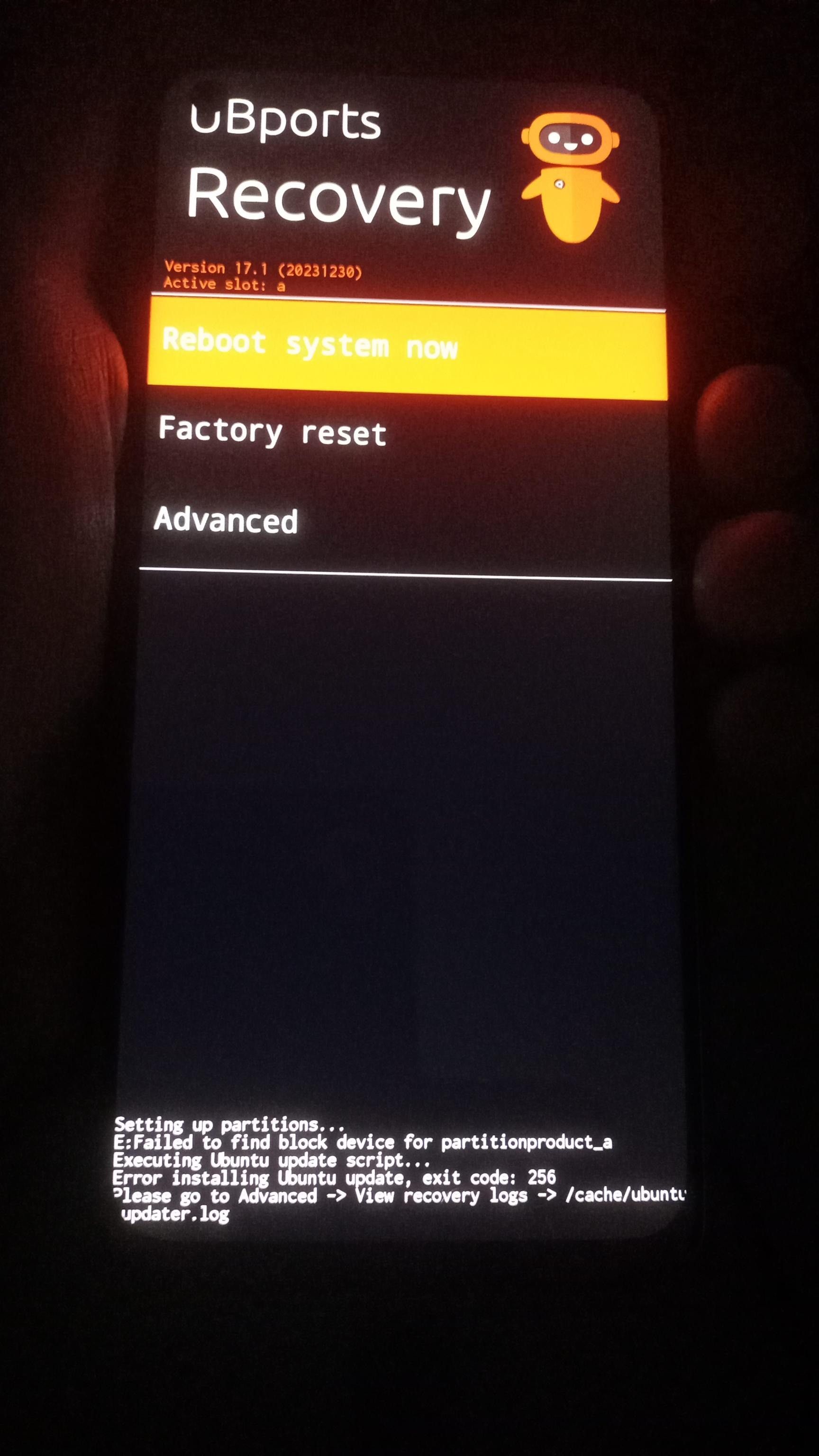
    It initially had 24.04-2.x, but I had to install 24.04-1.x to make some tests, and I cannot install 24.04-2.x again. I always get this errer message when installing.Any advice?

    ac8e90d6-f4bc-45fd-8e7f-8e9062e0681d-image.jpeg


    read more →
    @pparent I don't know if you'll risk it, I can't give you any warranty as it's not tested by me, but you could try to download the config file, edit it to set a bigger value for system_a: - fastboot:resize_logical_partition: partition: "system_a" size: 3221225472 and launch the installer with the -f option on the modified file. If you need hand holding, you could find more experienced people than me on this forum or on Telegram. edit: I forgot to say that you'll probably need to set a value in 4K blocks and multiply it by 4096.
  • pparentP

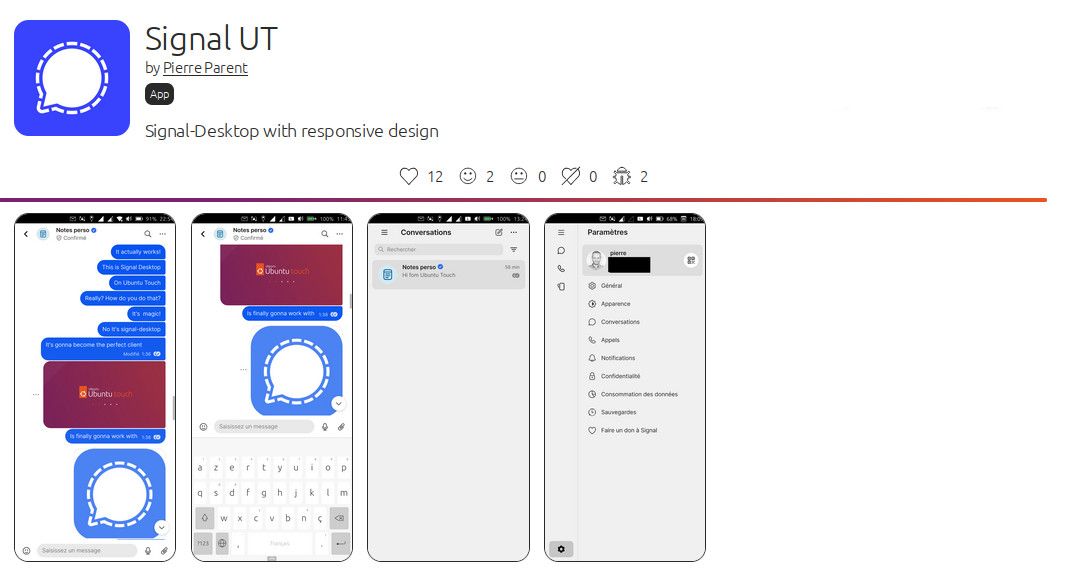
    Edit: Signal Ut is available on the OpenStore
    OpenStore

    19b00997-f477-45d6-924d-cadbfcb6864b-image.jpeg

    The following is the first post of the topic and is now outdated, read the latest posts for latest news


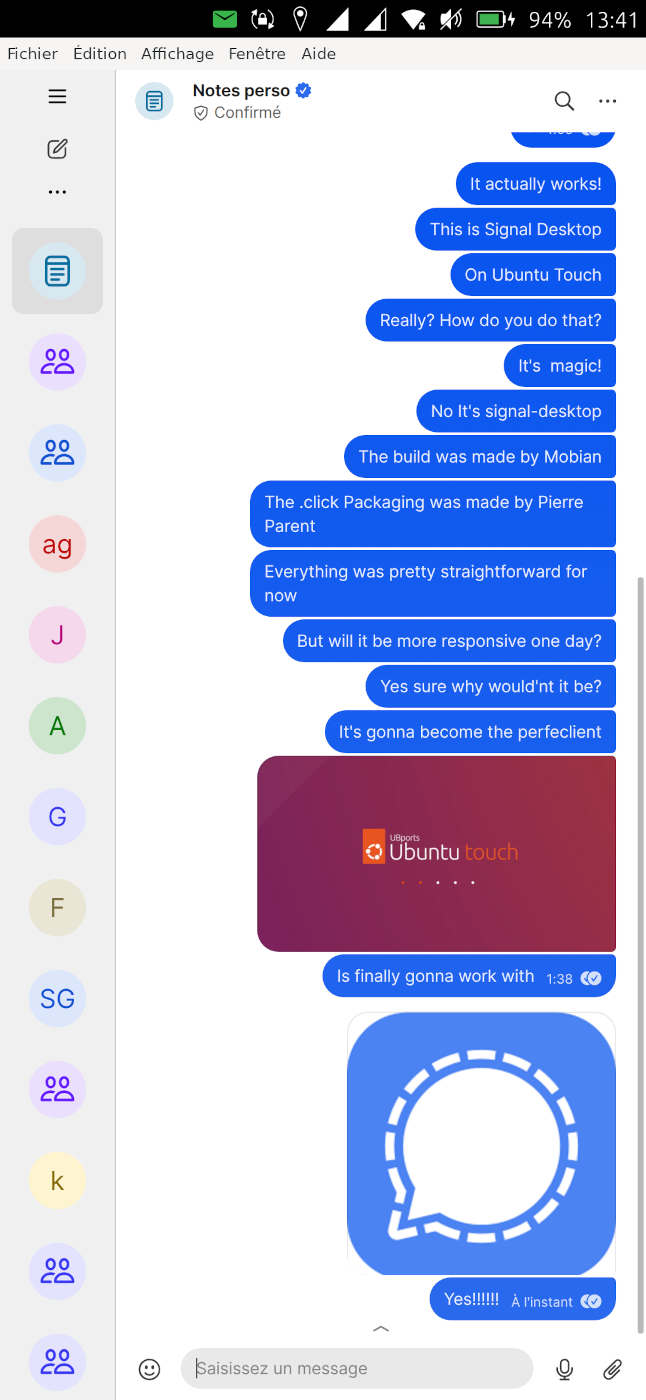
    I'm building a new application for the openstore: Signal UT, which will be a custom version of signal-desktop for Ubuntu Touch. I've already succeeded to build an initial .click package of signal-desktop for Ubuntu Touch with basic tweaking to have a more acceptable scale and have the keyboard working. I've made scripts to build it automatically. Currently it is based on a reuse of the binaries from https://snapcraft.io/signal-desktop . But it does not require to use snap to work, it's a standalone click package (that we'll be able to publish openstore later).

    https://github.com/pparent76/SignalUT

    The app is currently not responsive (but I plan to work on it):

    • You can reduce the left menu to it's minimal size, as a temporary workaround
    • The keyboard will display on top of the textedit, so you won't see what you type
    • [EDIT] Somehow the "enter" and "back" buttons of the keyboard do not work after starting the app, but locking and unlocking the phone with Signal in foreground will solve it. (Probably and Xmir problem)
    • You should be able to fine tune zoom by plugin in a keyboard and use the shortcuts Ctrl+= & Ctrl+- (untested)

    But it is already usable to consult messages, and send small messages (in a sub-optimal way)

    What also works or kind of works:

    • Sending Audio messages, and listening to them (seems to work quite well)
    • Audio calls (and it's possible to see video from the other person but internal camera does not work), call quality untested.
    • Receiving non-Ut desktop notifications when keeping app in background (even when the phone is suspended)

    screenshot20251024_134147855.png

    WARNING: This is experimental, use at your own risks. The app currently needs to run unconfined. It contains binaries, that are free software but that I've not compiled personally (coming from snapcraft.io ) and that I have not checked. I do not take responsibility in case of any problem

    Knowing that, if you want to be a tester, I'd be glad to get feedback from testers to know if it runs on other phones. So you will find a pre-built .click package here ( ONLY RUN ON NOBLE (24.04) ) :

    https://github.com/pparent76/SignalUT/releases/tag/FirstRelease


    read more →
    If anyone can report the current status of the app on 24.04-2.x, it would help, as I currently don't have a testing device compatible with it! https://forums.ubports.com/topic/12379/ubuntu-touch-24.04-2.0-call-for-testing/10 Thank's!
  • T

    Hello, I'm newbie, and I'm wondering about installing Ubuntu on a device with a broken screen. I have an old Samsung S7 Edge Exynos, with an unlocked bootloader and an auto-ADB ROM installed. On most Samsung phones, the stock operating system will boot-loop if there's no screen. I installed a custom ROM to bypass this. What about Ubuntu? Will this happen?
    Thanks all!!!!!!!!!!!


    read more →
    @nbdynl said: @trunghieu1710, out of curiousity, why would you want to have any os installed without a functioning screen? Where I live, they use a number of Samsung devices, including the Samsung S7. They use them in large quantities, around several hundred thousand, to run fake advertisements and obtain promotional codes.These phones have been modified to receive power directly and remove the screen, controlling everything entirely via ADB. I can buy them very cheaply and I want to take advantage of that.
  • E

    Hello all,

    Is there a way to uninstall the morph browser or to make an other, ie UWolf, the standard browser?

    EJ


    @projectmoon said: what is the way to undo this? update urls set domainsuffix=null where domainsuffix='nothing.org';
  • systemmaniac2010S

    Device Boot Loop Issue While Porting to Ubuntu Touch (Halium 13)

    I am trying to port my device to Ubuntu Touch, using Halium 13. I have flashed the images to the right partitions, but I encountered a boot loop with the following behavior:

    Boot Loop Sequence

    1. The device shows the Motorola start-up logo for one second.
    2. The device shows the unlocked bootloader warning screen for 6 seconds.
    3. It shows the Motorola logo again for 6 to 10 seconds, but now with a horizontal pixelated line on the screen.
    4. It then shows a blank screen for 5 to 10 seconds.
    5. The cycle repeats, but the line gradually moves down on each reboot.

    Troubleshooting Performed

    At this stage, I entered the fastboot bootloader and tried:

    fastboot boot twrp.img
    

    However, the device immediately started boot looping.

    I then replaced dtbo.img with the one from the latest LineageOS 20 build available for my device.

    After this change, the horizontal line disappeared.

    I was able to successfully boot TWRP using:

    fastboot boot twrp.img
    

    Logging Investigation

    I attempted to read the pstore logs but couldn't find any useful output.

    I suspected the kernel might not have been built with the required logging options enabled.

    To address this, I:

    • Created a separate logging.config file with the right kernel flags.
    • Added it to deviceinfo.
    • Verified that the options were correctly applied to the generated .config file located at:
    workdir/downloads/KERNELOBJ
    
    • Added the appropriate kernel command-line parameters to the vendor cmdline in the deviceinfo file.

    Current Status

    Despite these changes:

    • The device still does not boot properly.
    • USB does not become available.
    • The pstore directory remains empty even after enabling all relevant logging flags and kernel parameters.

    Source Tree

    For debugging and error analysis, the device source tree is available at:

    Please help me out with this.


    @systemmaniac2010 said: I have reached out to the telegram group and a member going by the username Pavel Glad you found support.
  • brenno.almeidaB

    Hi everyone! I've been working on a qml Whatsapp client for Ubuntu Touch for a few weeks, now I think its good enough for its alpha release.

    The app is not complete, there's still a ton of work to do, and probably many bugs. If you want to test it out, feel free to install in your device, and get back here if you find any bug so I can look at it. The Whatsapp protocol is awful to work with, I'm posting this early to gather feedback about edge cases.

    Consider this app as Alpha, don't use it expecting to be 100% functional or complete, but use it to give feedback and help with the development.

    Also the app runs unconfined to setup a background daemon, more on the architecture bellow.

    Releases here: https://github.com/brennoflavio/greenline/releases

    Once its stable, I'll publish to the store. Now more details about it.

    Architecture

    This app is composed of 3 parts:

    1. Golang Daemon

    This daemon managed by Systemd connects to Whatsapp servers and runs continuously in the background, gathering events and pre processing them. Also:

    • Manages your encryption keys
    • Serialize whatsapp events, stores in a queue
    • Expose a JSON RPC endpoint to read and send messages, among other operations
    • Syncs users avatars, media, and other data
    • Sends notifications
    1. Python Backend

    Event driven backend that pulls events from the daemon and acts on them, building a chat room and message database. It also sends events to the frontend, updating the message list in real time

    1. QML

    The frontend is entirely written in qml and communicates with python using pyotherside

    In order to pull messages in the background, it needs to run unconfined.


    read more →
    @brenno.almeida Thanks for the work again its fast, reliable, has push notifications. what else do we need xD? Well ok theres a few features that can be added, but i am sure that will all come when the time is ready
  • UBportsNewsU

    Ubuntu Touch Q&A 192 is live this Saturday 13th June. If you can, please join us at the usual time of 19:00 UTC.
    Before then, if you have any questions on or about Ubuntu Touch and UBports please post them below and we will do our best to answer them in the Q&A.

    Remember that questions on porting to device **** or its status, and questions on bugs, will not be answered.


    read more →
    @messayisto said: Will all the good stuff landed in 24.04.2 be backported to 24.04.1? No, not all the good stuff. But some of it might
  • Vlad NirkyV

    I was camping in the woods this weekend and was able to use Pure Maps to follow the hiking routes I’d created on my computer.
    For anyone who enjoys this sort of activity, it’s just brilliant!
    https://forums.ubports.com/topic/4568/how-to-import-a-gpx-track-into-pure-maps-unav/17


    @kristatos Oh fine for uNav. (good to know (available in the search context as I can see)) For hiking, I would prefer PureMaps and the OepnTopoMap map.