@Zer0 I hope you stay in touch with Ubuntu Touch.
Just like Ubuntu Touch itself, there are several layers to the Ubuntu Touch community. You'll find the right people.
 L
Offline
L
Offline
Posts
-
RE: I wanna go home
-
Powersave mode extrem
My personal use of cell phones:
- Calls + text messages: I want to be reachable at all times
- I only use the browser, email, messaging apps, cloud services, and other apps when necessary (like a camera)
Most days, the phone is unused for 90% of the time it’s turned on. So for 90% of my usage, even a Nokia 3210 (with up to 260 hours of battery life) would suffice.
Task: Given this usage pattern, how can I maximize battery life?
Workaround:
Install and open “UT Tweak Tools”
For all apps: Prevent background suspension = ON- Location services = OFF
- Bluetooth = OFF
- Wi-Fi = OFF
- Mobile data = OFF
- G2 network (optional)
Then run the script in the terminal:
...
#!/bin/bash
#Enables power-saving mode on all CPU coresfor governor in /sys/devices/system/cpu/cpu*/cpufreq/scaling_governor; do
echo "powersave" | sudo tee "$governor" > /dev/null
doneecho “Power-saving mode has been enabled for all cores.”
...New scenario:
- The phone enters deep sleep mode after a few minutes
- You remain reachable by phone and text message
- Set alarms and timers function normally
- Power consumption drops to an incredible ~22mA (Pixel 3a)
As a result, in this state, the battery level drops by only about 1–3% over a 10-hour period. (Tested on the Pixel 3a) Theoretically, a full charge lasts more than a week with minimal use. (see pritscreen)
Advantage: There are hardly any restrictions. You can turn on mobile data or Wi-Fi at any time and use any app with an internet connection. Afterward, turn Wi-Fi and mobile data off again.
Usage:
With appropriate usage habits, this can be the default mode. The reduced processor performance is barely noticeable. Only launching apps takes 1–2 seconds longer.The cores can be restored to normal performance using this script.
...
#!/bin/bash
#Enables Schedutil mode (default) on all CPU coresfor governor in /sys/devices/system/cpu/cpu*/cpufreq/scaling_governor; do
echo "schedutil" | sudo tee "$governor" > /dev/null
doneecho “Default mode (schedutil) has been enabled for all cores.”
..,It would be perfect if a “super power-saving mode” like that could be built into UT.
-
RE: Powersave mode extrem
@Moem
After clearing the saved Wi-Fi connections, power consumption is minimal.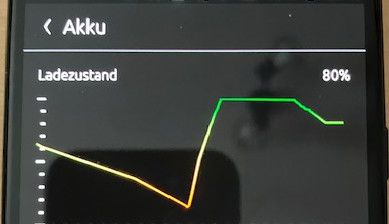
-
RE: Call for testing: Ubuntu Touch 24.04-1.3
I found the reason for my increased battery drain when using Wi-Fi.
On January 26, 2026, I installed an app called "UB Connect" from the OpenStore. ubconnect
I uninstalled it shortly after. The app wasn't uninstalled cleanly, and a ubconnect.daemon.service remained in the system.
Whenever Wi-Fi was turned on, this daemon would automatically start, but it failed because the app was missing. This prevented Ubuntu Touch from going into power-saving mode after the screen was turned off.After uninstalling and deleting all leftover files from the ubconnect app, Ubuntu Touch goes back into power-saving mode with Wi-Fi on, and the battery consumption is minimal like with mobile data.
-
RE: I wanna go home
I’ve been using Ubuntu Touch for four months. So I have no experience of older versions prior to 24.04.
The frequently cited arguments that “users were unsettled by these or those changes” therefore don’t apply to me.My conclusion: Getting started with Ubuntu Touch was a bit bumpy, but I now really appreciate how it works. What I appreciate most is the app chain on the left-hand side. This efficient, unique selling point should definitely not be tampered with. Switching between apps is also brilliant. I don’t miss a home screen, desktop, etc. at all. Least of all do I feel the need for the interface to resemble that of Android or iPhone.
I might have one wish: a multi-page app drawer (vertical or horizontal) or some other way of grouping apps rather than simply sorting them by name. Perhaps with horizontal dividers or spacing.
Translated with DeepL.com (free version)
-
RE: Powersave mode extrem
I was monitoring the journal with “sudo journalctl -f” while I turned the Wi-Fi on and off. I noticed that when turning on the Wi-Fi, a connection attempt by the daemon fails.
sudo journalctl -f
Mai 20 19:14:25 ubuntu-phablet systemd[2850]: ubconnect-daemon.service: Main process exited, code=exited, status=1/FAILUREMai 20 19:14:25 ubuntu-phablet systemd[2850]: ubconnect-daemon.service: Failed with result 'exit-code'.Mai 20 19:14:30 ubuntu-phablet systemd[2850]: ubconnect-daemon.service: Scheduled restart job, restart counter is at 89.Mai 20 19:14:30 ubuntu-phablet systemd[2850]: Started ubconnect-daemon.service - UB Connect Daemon.Mai 20 19:14:30 ubuntu-phablet aa-exec[5041]: [5041] aa-exec: ERROR: Failed to execute "/opt/click.ubuntu.com/ubconnect/current/usr/bin/ubconnect-daemon": No such file or directoryMai 20 19:14:30 ubuntu-phablet systemd[2850]: ubconnect-daemon.service: Main process exited, code=exited, status=1/FAILUREMai 20 -
RE: Call for testing: Ubuntu Touch 24.04-1.3
@ralf
I tested on three Pixel 3a devices for one week. No active use. All background services turned off. Location services and Bluetooth also turned off.The same behavior occurred on every device. When I turn on Wi-Fi, power consumption increases dramatically.
Without Wi-Fi: 1 to 2% per hour
With Wi-Fi: 4 to 6% per hour -
RE: FP5: Network Switching (Cell/WIFI) Not Happening When Changing Locations
@Futura Mobile network -> previous networks: Remove (forget) all networks and reconnect to your home network.
This solved a few network issues for me. -
RE: Is there a terminal command to disable the mobile data connection?
@gpatel-fr That´s perfect!
Thank you very much for solving this stubborn problem.Now I can put the Pixel 3a into ‘Nokia 3210 mode’ with a single click. Calls and text messages work, and the battery lasts at least three days in this mode.
#!/bin/bash # ==================================================================== # NOKIA 3210 MODUS: CPU throttling + All offline services (Pixel 3a) # ==================================================================== if [ "$EUID" -ne 0 ]; then echo "ERROR: Please run the script using: sudo $0" exit 1 fi echo "Enable Nokia 3210 mode..." # 1. Force CPU cores into power-saving mode for governor in /sys/devices/system/cpu/cpu*/cpufreq/scaling_governor; do if [ -f "$governor" ]; then echo "powersave" > "$governor" fi done echo "[✓] CPU throttling enabled." # 2. Turn off Wi-Fi nmcli radio wifi off echo "[✓] Wi-Fi disabled." # 3. Turn off location tracking (GPS) sudo dbus-send --system --type=method_call --print-reply --dest=com.lomiri.location.Service /com/lomiri/location/Service org.freedesktop.DBus.Properties.Set string:com.lomiri.location.Service string:IsOnline variant:boolean:false echo "[✓] Location tracking disabled." # 4. Turn off Bluetooth rfkill block bluetooth echo "[✓] Bluetooth disabled." # 5. Turn off mobile data sudo -u phablet DBUS_SESSION_BUS_ADDRESS="unix:path=/run/user/32011/bus" dbus-send --session --type=method_call --print-reply --dest=com.lomiri.connectivity1 /com/lomiri/connectivity1/Private org.freedesktop.DBus.Properties.Set string:com.lomiri.connectivity1.Private string:MobileDataEnabled variant:boolean:false echo "[✓] Mobile data disabled." # 6. Greenline-Service stop at user level XDG_RUNTIME_DIR=/run/user/32011 sudo -u phablet systemctl --user stop greenline.service 2>/dev/null echo "[✓] greenline.service stopped." echo "------------------------------------------------" echo "Success! CPU, wireless modules and GPS are in sleep mode." sleep 3 -
RE: Cell phone has Android V 11 image Oxygen OS 11.0.16.BE89BA
I had Windows decades ago... I have no idea how this will continue, please help me out. Otherwise I'll sell the thing again and it'll be a trip!
@fischer.poco You post random topics here from time to time in different languages, but you never respond to users' replies. What do you expect? A TeamViewer session?
-
RE: Hello
Sometimes, such severe restrictions can also lead to a huge surge in innovation and creativity.