now i can get back to deving(i think) ....i had a idea for the emulator its needs tons of mapper support ...so instead of running down all the hundreds of mapper code ....it hit me ...i live in the future .....im going to develop a sort of on the fly mapper interpreter engine for total mapper support ....i think ....thats the idea anyway ....a "just in time mapper" ....a "JIM" so to speak!
 D
Offline
D
Offline
Posts
-
RE: app clickable nes emulator
-
Introductions:
Hello my name is jeremy aka developerbayman im a web/android/python developer and im excited to get started developing native apps for UBT im glad to finally be able to participate took me awhile to get a device that can run UBT and i cant wait to meet new people and collaborate on this (oops i just realized where i posted this mods please move to appropriate place)
-
RE: [app]{public testing-workspace enabled}~UT_office
i asked chatgpt "how do i treat you?" it came back with ...

-
[app]{public testing-workspace enabled}~UT_office

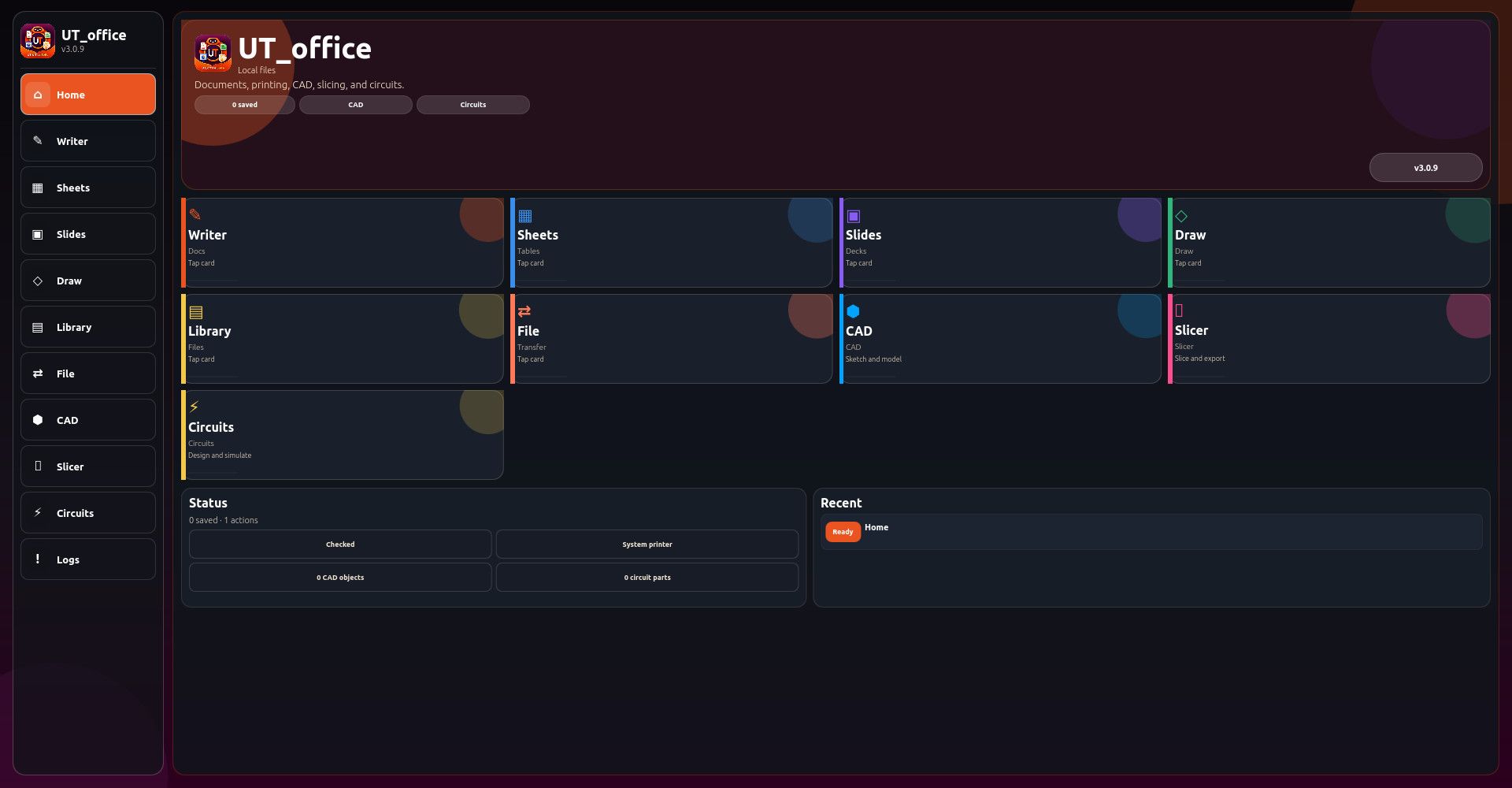
say hello to UT_office suite ....i would like to make it UT's premiere office program suite?? meant to be on par with and far exceed typical office program suites all rolled into a nice clickable app fully responsive and taking advantage of desktop convergence ....still alot of work to do yet much testing needed
Local-first office suite for Ubuntu Touch
Writer for rich-text documents
Writer formatting tools: headings, bold, italic, lists, tables, quotes, dividers, checklists, code blocks, signatures
Writer templates: report, meeting notes, letter, project document, appendix
Writer tools: find/replace, outline, statistics, reading time, word frequency, cleanup, case conversion
Writer exports: text, Markdown, HTML, JSON
Spreadsheet editor with editable cell grid
Spreadsheet formulas and recalculation
Spreadsheet range tools, fill down, sorting, locking, frozen headers
Spreadsheet templates: budget, calendar, inventory, profit/loss
Spreadsheet reports: stats, formula map, validation, charts
Spreadsheet exports: CSV, TSV, HTML, JSON
Slides editor with deck, slide, and notes support
Slide layouts: title, two-column, quote, blank, agenda, closing
Slide themes and aspect ratio options
Slide thumbnails, presenter tools, timing plan, notes export
Slide exports: outline, Markdown, HTML, JSON, SVG/handout-style previews
Drawing workspace with shape tools
Freehand drawing with pencil mode
Eraser and selection modes
Shape tools: rectangle, ellipse, diamond, note, connector
Drawing alignment, layering, duplication, grouping, snap grid, multi-select
Flowchart, org chart, grid, and wireframe drawing templates
Drawing exports: SVG, transparent SVG, HTML, JSON
Document library for saved Writer, Sheet, Slides, Draw, CAD, and Circuit files
Library search, filters, sorting, pinning, duplicate, trash, restore, and permanent delete
File Center for import/export workflows
Universal search across documents and commands
Print-ready HTML package generation
Print job ticket and printer setup notes
Workspace backup and restore-preview tools
Version history and manual checkpoints
Recovery snapshots and recovery restore
CAD workspace for simple 2D/3D design
3D primitives: cube, cylinder, sphere
CAD sketch tools: rectangle, circle, line, extrude
CAD object editing: move, resize, rotate, duplicate, center, snap, mirror, delete
CAD helpers: electronics enclosure, bracket, grid plate, vent slots, standoff pattern, mounting holes
CAD validation: dimensions, fit report, mesh quality, printability checks, design checklist
CAD exports: JSON, STL preview, OBJ preview, OpenSCAD, project packet
Separate 3D Slicer workspace
Prusa-style slicer workflow for print preparation
Slicer settings for printer, filament, layer height, nozzle, temperatures, infill, shells, speeds, cooling, supports, adhesion, seam, retraction
Slicer material presets: PLA, PETG, ABS, TPU
Slicer print presets: draft, detail, strength
Slicer preview modes and layer planning
Slice/preflight reports
G-code preview/export
Material usage estimates: filament length, mass, spool remaining
Cost estimates: material, electricity, total consumables
Slicer bed map and print bundle export
Electronics CAD / circuit designer workspace
Circuit components: voltage source, ground, resistor, LED, switch, capacitor, diode, potentiometer, transistor placeholder, probe, IC placeholder
Drag-and-place circuit components
Wire start/connect tools and auto-wire
Schematic and PCB-style modes
Real-time circuit simulation toggle
Animated signal-flow/voltage-current feedback
Circuit reports: simulation report, electrical check, trace report, breadboard plan
Circuit exports: JSON, SVG, netlist, SPICE-style report, BOM
Circuit templates: LED resistor circuit, voltage divider, RC timer
Command palette for quick tool access
Diagnostics and health-check reports
UI audit and package checks
Safe defaults and settings backup
Responsive UI for phone and desktop layouts
Horizontal scrolling ribbons and overflow popup menus for dense toolsets
LocalStorage-based offline data storage
Ubuntu Touch Click package structure with release/audit scriptsLocal-first office suite for Ubuntu Touch
Writer for rich-text documents
Writer formatting tools: headings, bold, italic, lists, tables, quotes, dividers, checklists, code blocks, signatures
Writer templates: report, meeting notes, letter, project document, appendix
Writer tools: find/replace, outline, statistics, reading time, word frequency, cleanup, case conversion
Writer exports: text, Markdown, HTML, JSON
Spreadsheet editor with editable cell grid
Spreadsheet formulas and recalculation
Spreadsheet range tools, fill down, sorting, locking, frozen headers
Spreadsheet templates: budget, calendar, inventory, profit/loss
Spreadsheet reports: stats, formula map, validation, charts
Spreadsheet exports: CSV, TSV, HTML, JSON
Slides editor with deck, slide, and notes support
Slide layouts: title, two-column, quote, blank, agenda, closing
Slide themes and aspect ratio options
Slide thumbnails, presenter tools, timing plan, notes export
Slide exports: outline, Markdown, HTML, JSON, SVG/handout-style previews
Drawing workspace with shape tools
Freehand drawing with pencil mode
Eraser and selection modes
Shape tools: rectangle, ellipse, diamond, note, connector
Drawing alignment, layering, duplication, grouping, snap grid, multi-select
Flowchart, org chart, grid, and wireframe drawing templates
Drawing exports: SVG, transparent SVG, HTML, JSON
Document library for saved Writer, Sheet, Slides, Draw, CAD, and Circuit files
Library search, filters, sorting, pinning, duplicate, trash, restore, and permanent delete
File Center for import/export workflows
Universal search across documents and commands
Print-ready HTML package generation
Print job ticket and printer setup notes
Workspace backup and restore-preview tools
Version history and manual checkpoints
Recovery snapshots and recovery restore
CAD workspace for simple 2D/3D design
3D primitives: cube, cylinder, sphere
CAD sketch tools: rectangle, circle, line, extrude
CAD object editing: move, resize, rotate, duplicate, center, snap, mirror, delete
CAD helpers: electronics enclosure, bracket, grid plate, vent slots, standoff pattern, mounting holes
CAD validation: dimensions, fit report, mesh quality, printability checks, design checklist
CAD exports: JSON, STL preview, OBJ preview, OpenSCAD, project packet
Separate 3D Slicer workspace
Prusa-style slicer workflow for print preparation
Slicer settings for printer, filament, layer height, nozzle, temperatures, infill, shells, speeds, cooling, supports, adhesion, seam, retraction
Slicer material presets: PLA, PETG, ABS, TPU
Slicer print presets: draft, detail, strength
Slicer preview modes and layer planning
Slice/preflight reports
G-code preview/export
Material usage estimates: filament length, mass, spool remaining
Cost estimates: material, electricity, total consumables
Slicer bed map and print bundle export
Electronics CAD / circuit designer workspace
Circuit components: voltage source, ground, resistor, LED, switch, capacitor, diode, potentiometer, transistor placeholder, probe, IC placeholder
Drag-and-place circuit components
Wire start/connect tools and auto-wire
Schematic and PCB-style modes
Real-time circuit simulation toggle
Animated signal-flow/voltage-current feedback
Circuit reports: simulation report, electrical check, trace report, breadboard plan
Circuit exports: JSON, SVG, netlist, SPICE-style report, BOM
Circuit templates: LED resistor circuit, voltage divider, RC timer
Command palette for quick tool access
Diagnostics and health-check reports
UI audit and package checks
Safe defaults and settings backup
Session handoff report for continuing development in a new chat/session
Responsive UI for phone and desktop layouts
Horizontal scrolling ribbons and overflow popup menus for dense toolsets
LocalStorage-based offline data storage
Ubuntu Touch Click package structure with release/audit scriptsclick:
https://drive.google.com/file/d/1cqYdIjnXoPLKdF3jwEPiUT1k7DOmrfeo/view?usp=sharing -
i need to drop a big thank you UBports community!
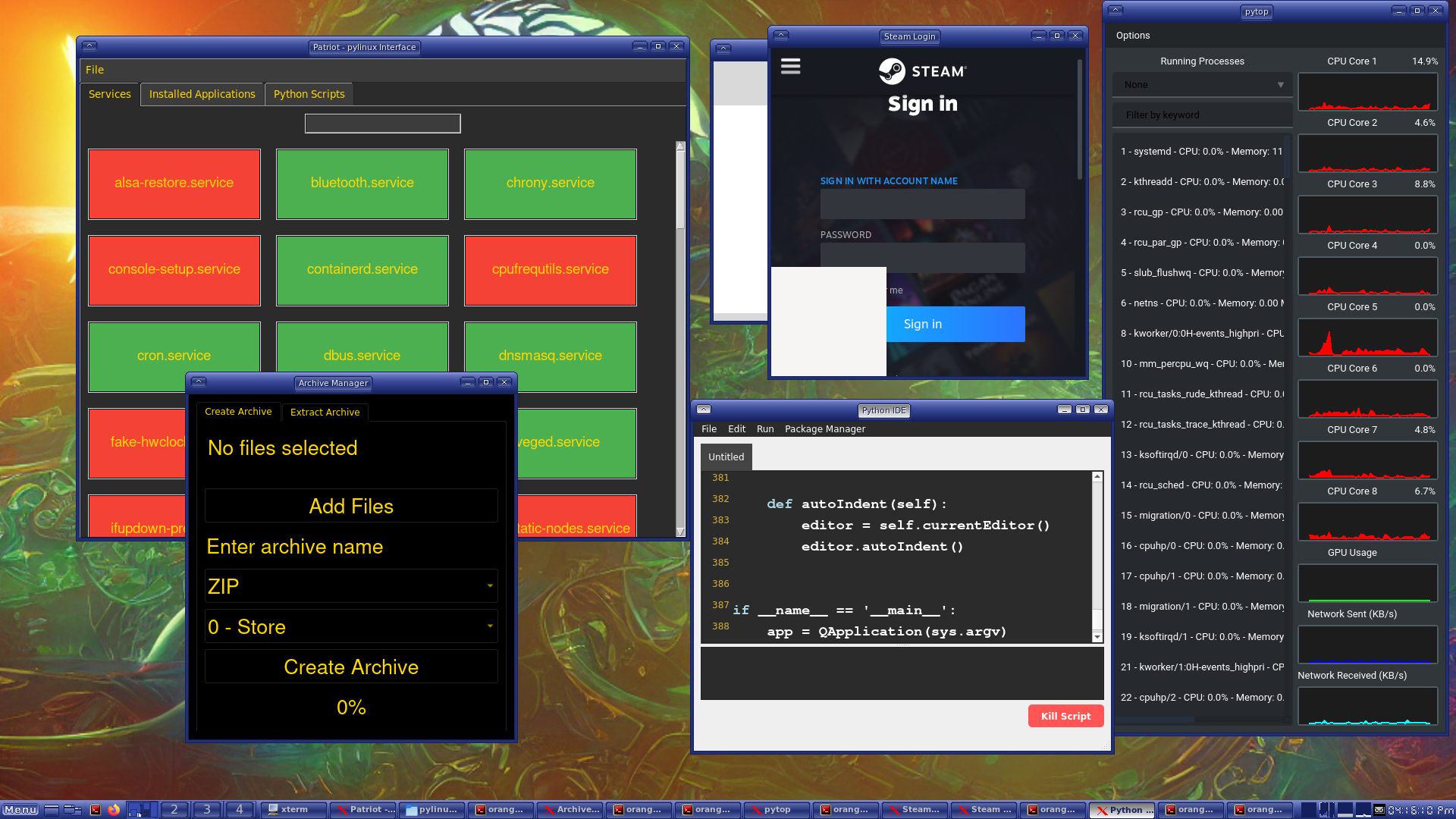
i joined this community the day after my mom died ... not only did i get alot of love and support and a great distraction ....at the end of the day this is a great community! .... thank you!
now i ended up leaving ubuntu touch because it wasnt what i was looking for in a mobile operating system ...and thats ok
.....not only do i owe thanks for the emotional support but also thanks for the inspiration .... the things i dont like about UT lit a fire under me and eventually gave birth to "pylinux" .....while built on top of linux the total user software stack is all python applications (lol growing pains) eventually the total goal is to eventually port everything to python ....time will tell
after i post this im going to switch over to my pi then i can post picture of pylinux in action (sort of still a work in progress) .....but i would love to talk about it .....when designing most of the tools for pylinux ubuntu touch was in the back of my mind
-
RE: any way to change desktop environment?
@kugiigi lol true i could ....but i wont....for some reason im totally obsessed with UT (prob all the years i wanted a UT device)
....basically i look at it like this ....this is the platform i have chosen so what i will do is go long term once i master the dev cycle (like i did with android) i will just create the functionality i want
see part of the fun also is the feed back
Also i have to point out ...why even have libertine if not for power users?(i mean yeah i know its usefull for general use)
Its so close to being every devs nerd dream power pocket pc phone
~according to my beliefs i must remain a broken record on this ....even tho it might not have any real world effect lol
-
RE: Few thoughts regarding coming back after several years
@Moem thanks man i appriciate that .....also as much as i might complain .....the UT community is filled with such wonderful people as yourself .....i cant walk away from that
-
RE: UT app kinda like aide?
@schlicki2808 thats pretty cool you made that?
-
RE: Redmi note 9 screen not rotating
@TandyNeoma basically some of xaiomi redmi note 9 pro android 10 roms feature broken sensors took awhile but foumd one that works again
-
RE: Advice on android apk's on m10 x306x
the .xapk contains the obb files ...so the extaction should contain the apk and obb you will need to place in the android obb folder manually
-
what is UT's stance on forced ID compliance?
im totally against it in all forms pylinux will NOT be falling in line ....its not to protect the children ...name one child that has a ID or a passport? ....all it is is a path to shoe horn total surveillance ...elimination privacy one bleeding heart lie at a time
...im violently against this because i see it exactly for what it is ...another lie....if they really cared about the children everyone on the list would be hanged
i would encourage UT to NOT comply based on the fact UT's core value's is privacy and security but i think we should talk about it..lol p.s im also being a drama queen pylinux is all raw python i couldnt enforce it if i wanted to
-
RE: Advice on android apk's on m10 x306x
@Lindisfarne rename the .xapk to .zip and extract it
-
RE: Workaround for Internet access restrictions affecting ubports-installer
obtain your image and fastboot flash the image manually or per your device guidelines for manual flash
-
RE: {clickable-utility-release} ~Clickable-Manager
i keep adding clickable commands prob gonna do them all over time
eventually gonna put a loop on it to keep the menu open
also create a clickable create instance in a non clickable directory
-
RE: Waydroid Clipboard Copy/Paste over UT not working
@arubislander i wonder an app kinda like waydroid helper but for python giving many options allowing users to maintain storage concerns
-
RE: Workaround for Internet access restrictions affecting ubports-installer
@Vlad-Nirky im not sure what you mean you need to downgrade to the appropriate android version for your device then get the ubuntu touch install files extract it and you gonna hold on my phone volume and up then it will enter fast boot mode then your gonna flash the same files usually the same name as the partion something like this fastboot flash boot boot.img && fastboot flash recovery recovery.img && fastboot flash system system.img && fastboot flash userdata userdata.img .......if you dont know about adb or fastboot you will need to look those up first and have a tiny bit of comfortability in a terminal ...but its pretty easy
-
RE: Would it be possible to port this app?
if i can get my way i have like 50 apps to bring over to UT including a entire office suite .....i want to bring my AI assistant over but i dont think it will work very well .....meh phones ....but yeah its for sure on my todo