Hi all !
After successfully unlocking the boot loader, I used the installer to flash my tablet TB-X306F.
It stalled somewhere in the process.
It did not reboot.
The screen is the BLACK screen of death.
It does not power on no matter how I tried with volume down + power button, or volume up, or even both up + down + power.
I did the same install successfully with my other twin same exact tablet.
Any help more than welcome.
Peace !
World
Topics from outside of this forum. Views and opinions represented here may not reflect those of this forum and its members.
-
Koloběžky, kola, EUC, skateboardy a zkušenosti s nimi
-
-
Hi There, I am Franzo, a musician, programmer and FOSS Software/Gaming Enthusiast. I'll play Opensource Games here every week and play/spectate tournaments as well! (LIVESTREAMS: https://video.hardlimit.com/w/oNhei3W9ER6se1G7vZXmTx BACKUP: https://peer.madiator.cloud/w/uL7HZJiR5HvKfv4vWP3pec ) Get the latest news here: https://mastodon.social/@opensourcegaming If you want to join my matrix space here is the link: https://matrix.to/#/#osg:matrix.org You can join the stream chat from the livestream or from there. Or, if you prefer, you can join from the irc room on the FGD network (#osg-stream on irc.freegamedev.net); SCHEDULE: - SATURDAY/SUNDAY : 21:15 (🇪🇺 CET ) - 19:15 (🌍 UTC)
-
I'm Nick, and I like to tinker with Linux stuff. I'll bumble through distro reviews, tutorials, and general helpful tidbits and impressions on Linux desktop environments, applications, and news. You might see a bit of Linux gaming here and there, and some more personal opinion pieces, but in the end, it's more or less all about Linux and FOSS ! If you want to stay up to snuff, follow me on Mastodon: https://mastodon.social/@thelinuxEXP If you can, consider supporting the channel here: https://www.patreon.com/thelinuxexperiment
-
The Discussion on Linux-based Phones.
**Benefits**:- Hardware freedom. - Perfect operating-system competition. - Full utilization of specs. - Phone lifespan raises to 10+ years. - Less e-waste.
**Linux Mobile Distros**:- Ubuntu Touch - Sailfish - FuriOS - Postmarket OS - Mobian - Pure OS - Plasma Mobile - LuneOS - openSUSE Mobile - Nemomobile - Droidian - Mobile NixOS - ExpidusOS - Maemo Leste - Manjaro Arm - Tizen - WebOS
**Linux Mobile Hardware**:- Fairphone 5 - Volla Phone - PinePhone - FLX1 - Librem 5
⚙️Contribute- Ubuntu Touch - Sailfish OS - FuriOS - Postmarket OS - Mobian - Manjaro Arm - Nemo Mobile - Plasma Mobile - LuneOS - Maemo Leste - Librephone
🧼Go Clean From the Duopoly:- !deapple@piefed.social - !deGoogle@lemmy.ca
💻Related Communities:- !linux@programming.dev - !librephone@programming.dev - !alpinelinux@lemmy.ca - !linux4noobs@programming.dev - !linuxvr@lemmy.ca - !privacy@programming.dev
📰News:- Linux Phone Apps - Linux on Mobile
💬Messager:- !matrix@programming.dev - !simplex@programming.dev
⌚️Watch:- !asteroidos@piefed.social - !pinetime@programming.dev
-
A community for discussion about Mozilla Firefox.
A world of content at your fingertips…
Think of this as your global discovery feed. It brings together interesting discussions from across the web and other communities, all in one place.
While you can browse what's trending now, the best way to use this feed is to make it your own. By creating an account, you can follow specific creators and topics to filter out the noise and see only what matters to you.
Ready to dive in? Create an account to start following others, get notified when people reply to you, and save your favorite finds.
Register Login-
-
Since some time ago uNav removed the link parse when sharing a link from Morph. And I was thinking how about to make a translation app. It's still a step in the middle but I hope, and with farther cases, a useful app also for someone else.
I present you: Where?
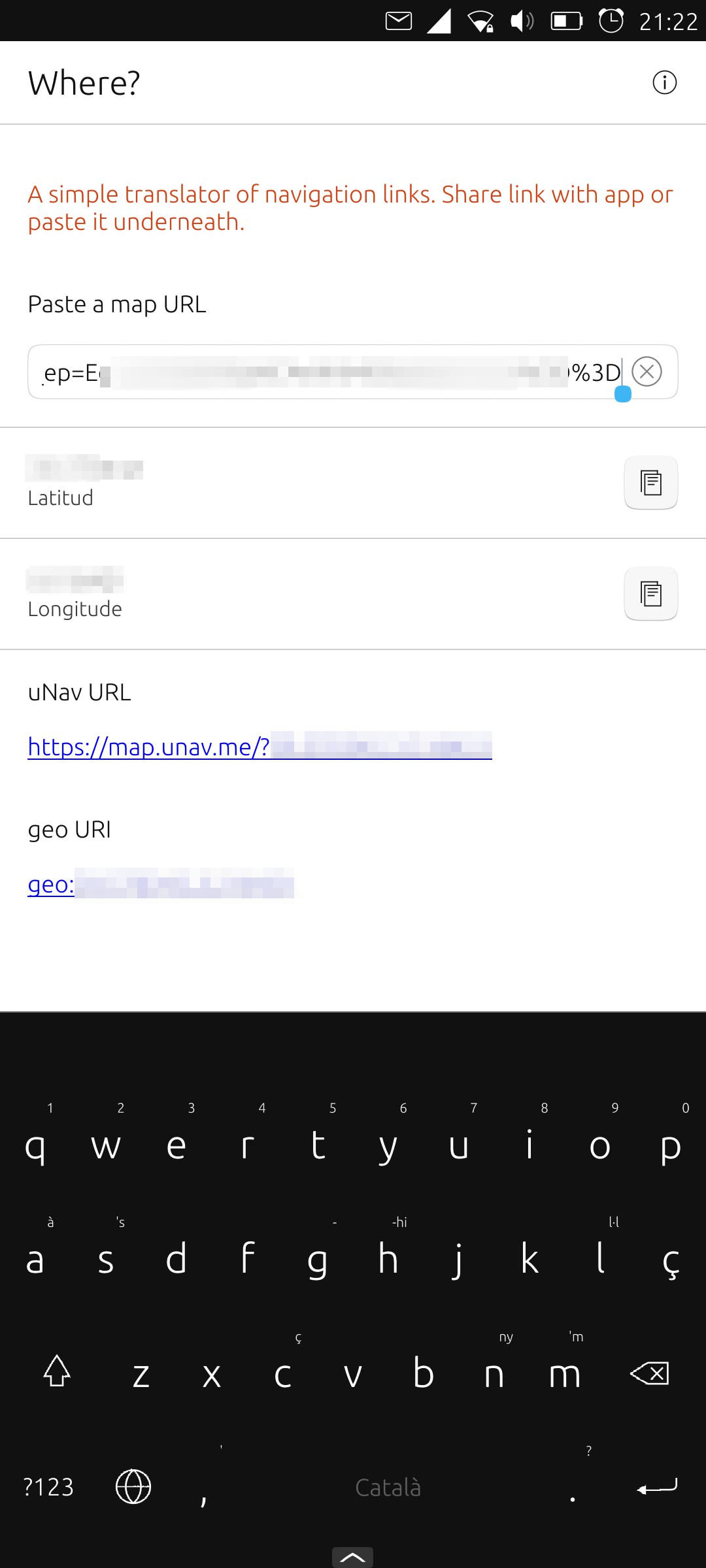
https://open-store.io/app/where.cibersheepIt will open those short-code GMaps links that I find so annoying, try to get latitude and longitude and translate to standard geo URI and uNav map.
How to use:
- Tap on a GMaps shortcode and let Where? take care of it
- Share a link with Where? via ContentHub
- On the main page of Where? copy latitude and longitude or tap on the new created links
Screenshots
New version of Where? Better detect weird gmaps links (again) Add paste button in TextField Don't disable paste button (TextField-canPaste is false when app launches) Remove buttons from ListItems, copy on tap Enable lat and long when there's a value Update Catalan translation Fix link not enabled on Original URI Added Long URI, and its shortcode -
The issue:
- I've set up some links to open by App1
- Inside App1, I show a link
- This link, when tapped, is opened by App1
How do I force the link to be opened with Morph?
I've seen this, but I couldn't make it work as
Qt.openUrlExternally("appid://morph-broswer.ubports/morph-broswer/current-user-version" link)Is the ContentHub required?
-
Hello,
device and OS first: Volla Phone X on UT 24.04-1.3 stable.
I probably have a simple little problem (I had this before upgrading the OS so it's not due to the OS version):
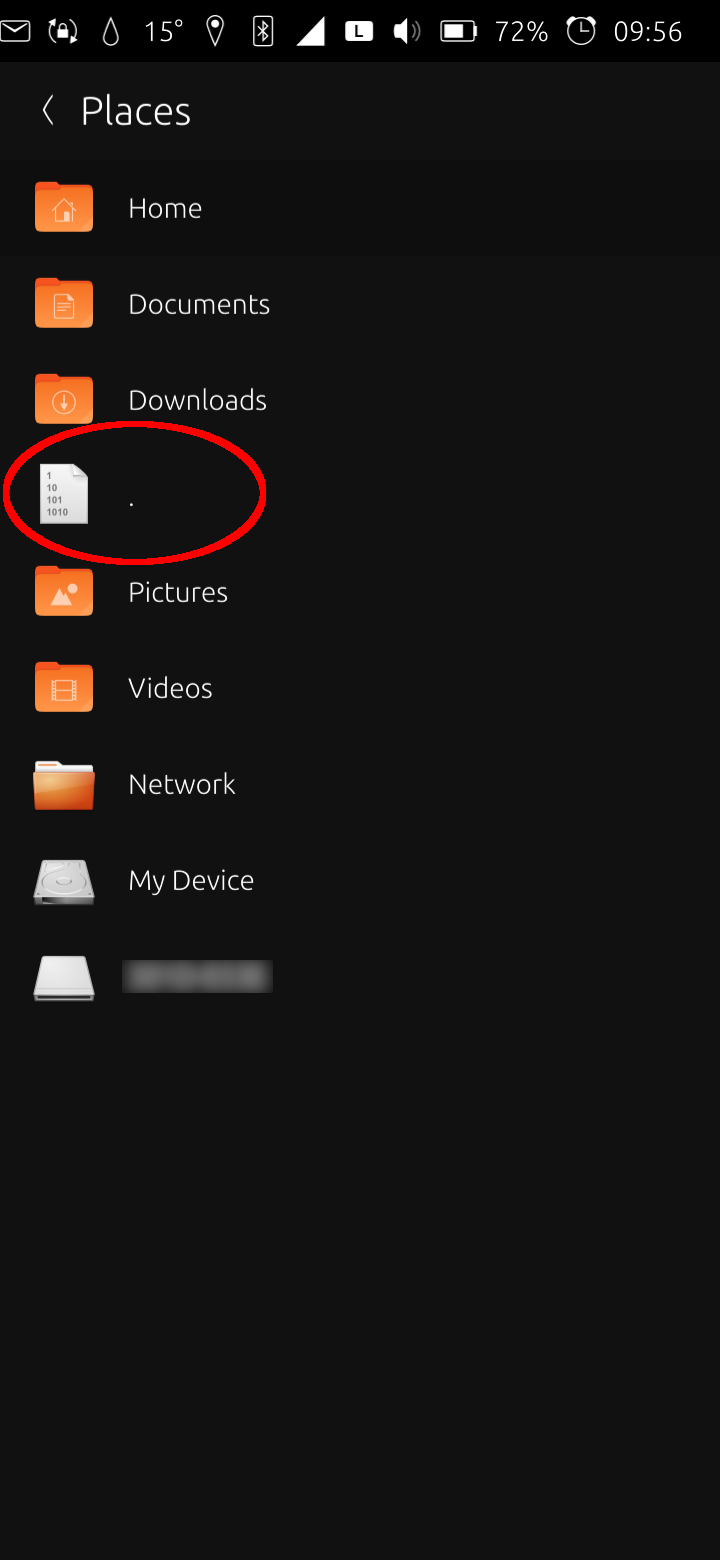
When tapping on the menu in the upper left in the file manager you get to "Places". I've got a file there (instead of the "Music"-folder) I want to remove since it doesn't belong there. How do I get rid of that file that is unfortunately named "."? I can't see any sub-menu or similar to do so.Earlier, after e.g. a folder has been selected, there was a button to add it to "Places" to get faster access. I still see this on my other device. This button also has gone on my Volla X. Therefore, I can't add "Music" to "Places" again. How could I correct this? Should I reinstall the file manager? How to do so, since it's a pre-installed app?
Thank you!
"Places" case solved. What I obeserved in short: At startup, "Places" is created and provides shortcuts to standard folders (immutable): Home, Documents, Downloads, Music, Pictures, Video, Network and Root folder. These folders can't be deleted from there (no trash can symbol). This list is expandable with any folder. These are removable, too (trash can symbol on swipe right). "Music" folder was deleted (accidently, I didn't realize at first). "Places" tried to provide a link to this non-existent folder which ended up with a ".". "Music" folder was recreated and appeared at the bottom of the "Places" list while "." still existed. After a reboot, "Places" got organized again (or rebuild by scratch). "Music" folder could be referenced again and "Places" was rebuilt as intensioned and looks normal again. No "." for a folder that could not be found. Sorry for causing this confusion and any inconvenience. It happens, when you're chronically overworked. -
Hello,
This is meant to collect the steps I took, which worked, and which I distilled from various documents and sites, and much reading of this forum, in hopes it might help clear someone else’s mind a bit… (and maybe mine, later.)
- adb & fastboot were run on Macbook Air in MacOS14 using platform-tools-latest-darwin.zip
- Tablet has 4GB RAM & 64GB Storage
- Android TB-X306F_S230940_240402_BMP
There were almost no obstacles…
Enabling Developer Mode
In Android Settings:- .. System.. About.. quick taps on Build Number - OK
In System.. {Developer Options}: - Enabled OEM Unlocking - OK 1st try
(After reboot, 2nd try, option was greyed-out OFF… message appeared: “connect to WiFi or contact operator” - once connected to WiFi, 3rd try - OK) - Enabled USB debugging - OK
- I also changed default USB mode to “File Transfer”
(probably superfluous)
The Hurdle
VolumeUp+Power did not boot device from OFF state to Fastboot Mode. Not my one, maybe others.Unlocking Bootloader
On Macbook Air:- I unzipped platform tools zip file in a Desktop folder ‘tools’
- Lenovo tablet ON and in Android
- Connected USB-C to USB-C & authorised debugging on Lenovo’s screen
In MacOS Terminal, as typed:
cd ~/tools/
./adb devices - OK
./adb reboot bootloader - OK
./fastboot flashing unlock_critical - OK
./fastboot reboot - OK - booted to Android
./adb devices - OK
Installation with UBPorts Installer 0.11.2
- Lenovo device was recognised
- I selected 'Ubuntu Touch'
- Then 24.04… Stable
- Also 'Erase User Data'
The installation jogged along until the tablet rebooted into Ubuntu Touch. I was not tempted to touch the tablet or the Mac. No.
No, not a bit. Anyways, don’t. - Ubuntu Touch booted its beautiful self!
- An App Update was available, so I accepted that.
- There was a request to allow the Mac to access an external storage (the tablet, must be) so I allowed that.
- Ubuntu Touch home screen and gesture prompts.
Done.
I reported PASS for a successful result.
Now I’ll get started making it my own.Regards,
KJU[My first attempt with this device, after one former success with a Pixel 3a xl (bonito) and too much sad failure with a Nexus 7 (2013) (flo, or flox? with messed-up partitions…)]
-
Today is Ubuntu Touch Q&A Day
Ubuntu Touch Q&A190 is today at 19:00 UTC please join us on our YouTube channel: https://www.youtube.com/watch?v=OkOT9otE_AA
Questions can be posted during the show or for priority using this link: https://forums.ubports.com/topic/12255/ubuntu-touch-q-a-190-call-for-questions
UBports@telegram
#ubports:matrix.org#UBports #UbuntuTouch #UBportsQandA #Lomiri #OTA12 #Ubuntu #UTnoble #MobileLinux
-
I've mentioned in Smooth Edges a bug that drives me mad concerning the fact that I regularly loose mobile data on my Vollaphone 22 on 24.04-1.1 ( with "free mobile"), and I have to switch to 2G then go back to LTE to have it working again.
I have investigated and now I know more. It seems to be an IP adress problem. When the bug appears I see "L" (for LTE) in the status bar but I have:
ccmni1: flags=193<UP,RUNNING,NOARP>  mtu 1280
        inet6 fe80::58e:ee25  prefixlen 64  scopeid 0x20<link>
        unspec 00-00-00-00-00-00-00-00-00-00-00-00-00-00-00-00  txqueuelen 1000  (UNSPEC)
        RX packets 123325  bytes 160619148 (160.6 MB)
        RX errors 0  dropped 0  overruns 0  frame 0
        TX packets 47763  bytes 4939925 (4.9 MB)
        TX errors 0  dropped 0 overruns 0  carrier 0  collisions 0
And ip route is null.
After swtiching to 2G and then 4G I get
ccmni0: flags=193<UP,RUNNING,NOARP>  mtu 1500
        inet 10.15.62.187  netmask 255.0.0.0
        unspec 00-00-00-00-00-00-00-00-00-00-00-00-00-00-00-00  txqueuelen 1000  (UNSPEC)
        RX packets 834  bytes 79443 (79.4 KB)
        RX errors 0  dropped 0  overruns 0  frame 0
        TX packets 22  bytes 5869 (5.8 KB)
        TX errors 0  dropped 0 overruns 0  carrier 0  collisions 0
phablet@ubuntu-phablet:~$ ip route default via 10.15.62.187 dev ccmni0 proto static metric 700 10.0.0.0/8 dev ccmni0 proto kernel scope link src 10.15.62.187 10.15.62.187 dev ccmni0 proto static scope link metric 700Next time I see the problem I will see if running a simple dhclient solves it (I think it will). If so I might write a simple script to detect when I loose the IP while the LTE network is connected, and trigger automatically a dhclient as a temporary fix for my own use. Even if including a fix to the system would be ideal.
-
Note:
The information below is outdated. It's just kept to preserve history.
NONE OF THIS IS NECESSARY SINCE FOCAL, WAYDROID COMES PREINSTALLED, YOU JUST NEED TO INITIALIZE IT
Hello everyone, I recently put together a very small guide on getting Waydroid to work on Ubuntu Touch, even with unofficially supported devices (Anbox supports very few devices so Waydroid is a great alternative) and I wanted to share it because I ran into many issues during the installation so I had to do some research by myself since apparently no one had the same issues as me.
To install Waydroid, run these commands in a terminal
sudo -s
sudo mount -o remount,rw /
apt update
apt install waydroid -y
waydroid init
Restart your device, then:
sudo waydroid container start(this command may hang or output
WayDroid container is RUNNING, both should be fine. Just open another terminal tab. This applies every other time you're gonna be executing this command)waydroid session startFirst time should work (Note: you can close the terminal app but I recommend keeping it open, or it may crash. Let it be, it doesn't cause any issues). After you're done messing around Waydroid, open terminal and type:
sudo waydroid container stop

waydroid container stop
to close it. Alternatively, use the recent apps thing.
I recommend rebooting but it's optional.
Next time you want to use Waydroid, open the app drawer and click its icon. If it crashes, open the Terminal app (I recommend keeping it open) and type:sudo waydroid container start waydroid session startNext, click on the Waydroid icon in the app drawer if nothing happens after the second command. If it crashes, check the terminal tab where you ran sudo waydroid container start for any errors. If you see any umount errors, run:
umount /var/lib/waydroid/rootfs(most commonly, if not adjust the command to what you need)
Now, run
sudo waydroid container start waydroid session startIf when you run waydroid session start you see
/dev/anbox_binder appearedor something similar, that means you've successfully started Waydroid. If not, repeat the last step.
If you tap the Waydroid icon in the app drawer and it crashes, just wait for a bit. It's just starting, and after a while you should hear a notification sound and a couple of seconds later the LineageOS UI
I've taken the first part from this comment under another topic, however I had to figure out the last part for myself. I tried this on two Redmi Note 8T's through an unofficial port from TheKit and an OnePlus 5 from a friend. The only issue I've encountered (on the Note 8T) is that while Android works, it's kind of jittery, almost like there's no HW acceleration (most noticeable when pulling down the notification center). The system responds to the inputs but is laggy, so if anyone could help me fix that, I'd appreciate it, although it's not an officially supported device so I don't really know.
-
I run Ubuntu Touch on my Volla Phone Quintis. On my Volla tablet I currently have Volla OS based on Android 15.
I want to switch the tablet to Ubuntu Touch as well.
I asked Volla support; they said they can do it for €50, but I could do it myself with the UBports installer.
UBports says the Volla tablet is built on Halium 13, so I assume it needs Android 13. I asked support how and where to obtain an Android 13 image or how to downgrade, but their only response was that I don’t need to install Android since Volla OS is based on Android—they didn’t answer my questions.
I also asked whether Volla OS 15 uses Android 13 userspace, but got no useful response.
They sent a link to an SP Flash tool, but at the same time insisted I don’t need to install Android because Volla OS is Android-based. It’s confusing: they said I don’t need to install Android, yet they sent a flashing tool.
Does anyone know what I should do?
-
Edit:

The following is the first post of the topic and is now outdated, read the latest posts for latest news
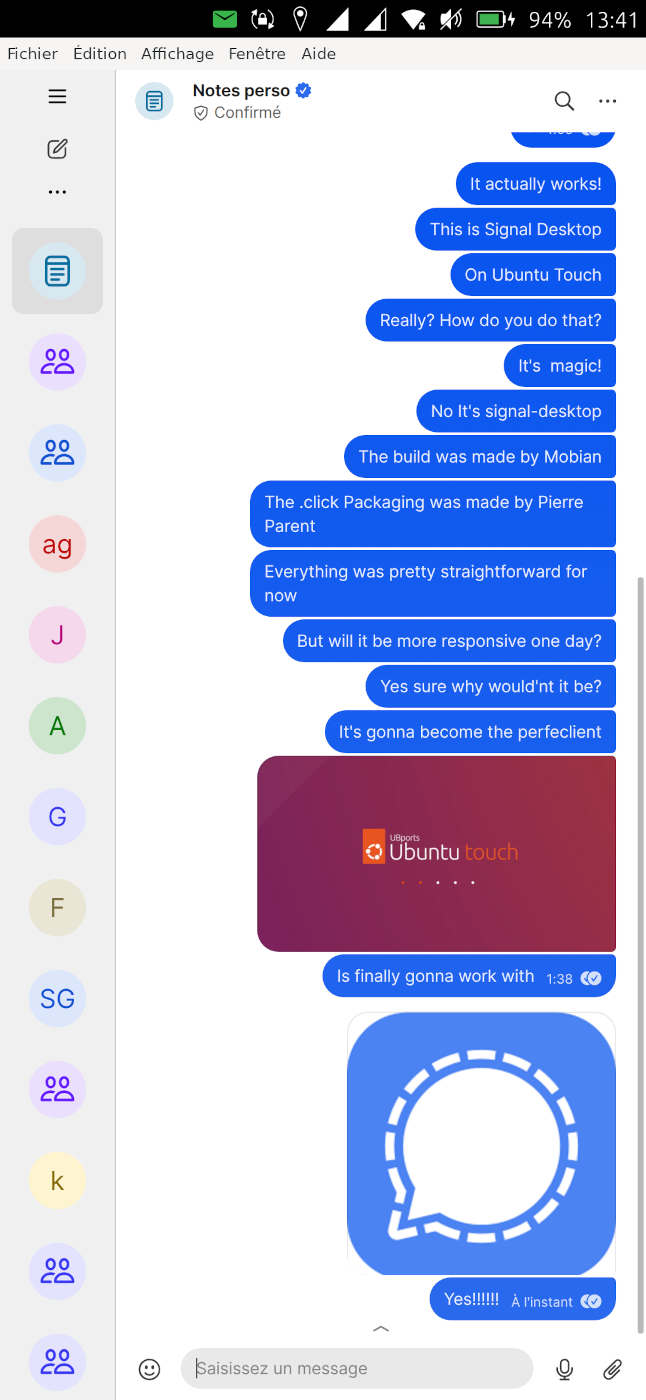
I'm building a new application for the openstore: Signal UT, which will be a custom version of signal-desktop for Ubuntu Touch. I've already succeeded to build an initial .click package of signal-desktop for Ubuntu Touch with basic tweaking to have a more acceptable scale and have the keyboard working. I've made scripts to build it automatically. Currently it is based on a reuse of the binaries from https://snapcraft.io/signal-desktop . But it does not require to use snap to work, it's a standalone click package (that we'll be able to publish openstore later).
https://github.com/pparent76/SignalUT
The app is currently not responsive (but I plan to work on it):
- You can reduce the left menu to it's minimal size, as a temporary workaround
- The keyboard will display on top of the textedit, so you won't see what you type
- [EDIT] Somehow the "enter" and "back" buttons of the keyboard do not work after starting the app, but locking and unlocking the phone with Signal in foreground will solve it. (Probably and Xmir problem)
- You should be able to fine tune zoom by plugin in a keyboard and use the shortcuts Ctrl+= & Ctrl+- (untested)
But it is already usable to consult messages, and send small messages (in a sub-optimal way)
What also works or kind of works:
- Sending Audio messages, and listening to them (seems to work quite well)
- Audio calls (and it's possible to see video from the other person but internal camera does not work), call quality untested.
- Receiving non-Ut desktop notifications when keeping app in background (even when the phone is suspended)
WARNING: This is experimental, use at your own risks. The app currently needs to run unconfined. It contains binaries, that are free software but that I've not compiled personally (coming from snapcraft.io ) and that I have not checked. I do not take responsibility in case of any problem
Knowing that, if you want to be a tester, I'd be glad to get feedback from testers to know if it runs on other phones. So you will find a pre-built .click package here ( ONLY RUN ON NOBLE (24.04) ) :
https://github.com/pparent76/SignalUT/releases/tag/FirstRelease
-
Ubuntu Touch Q&A 190 is live this Saturday 16th May. If you can, please join us at the usual time of 19:00 UTC.
Before then, if you have any questions on or about Ubuntu Touch and UBports please post them below and we will do our best to answer them in the Q&A.Remember that questions on porting to device **** or its status, and questions on bugs, will not be answered.
-
This post is meant to have a more continuous discussion about PicPocket development.
Download it here: https://open-store.io/app/picpocket.brennoflavio
Yesterday we had a new release allowing zooming images with your fingers, please give it a try!
This app is mostly stable and no big changes are expected, but feel free to suggest unimplemented Immich features and bugs.
read more →Just pushed a new release for this app: Better image and video controls. Pinch to zoom, double tap, and other gestures. (thanks @kugiigi , heavily inspired in your commit for the gallery app) Upgrade some libraries Don't crash the person list page if a person does not have a thumbnail Support servers with subpaths (like https://example.com/immich) Give a better error to the user if app cannot connect to Immich on login -
Did anybody encrypt user data?
I tried, but it was failed.
My steps:
0 - install ubuntu, turn on, select country -> wifi -> device name -> password
1 - reboot recovery
2 - connect via adb
3 - umount /cache
4 - e2fsck -f /dev/block/bootdevice/by-name/userdata
5 - tune2fs -O encrypt /dev/block/bootdevice/by-name/userdata
6 - reboot, connect via adb
7 - sudo mount -o remount,rw /
8 - sudo apt update
9 - sudo apt install fscrypt libpam-fscrypt -y
10 - sudo fscrypt setup
11 - run "sudo nano /etc/deviceinfo/devices/surya.yaml" and add "FilesystemEncryption: true" to end of file
12 - reboot, in UI I go to System Settings -> Security -> Filesystem Encryption -> enable and enter current password
13 - phone reboots during encrypting
14 - then I see boot screen -> enter password -> I see boot screen one more time -> then looks like a new system, I need to select country -> setup wifi -> set device name, but a keyboard doesn't work, and swype doesn't work. And I only can reboot to recovery and do factory reset.
As e result I have no encrypted device.
Do I do something wrong? or I need to do next "If your device uses kernel version 4.14 or 4.19, then you can backport policy version 2 support from the Android Common Kernel repository."? Does any body have an instruction?
Thank you
-
Since you care about it, you are the most likely person to make it happen. In order to make it happen, what's needed is: the ability to unlock the bootloader the kernel source someone who is willing and able, and has the skills or is willing to learn and who has the device in hands. If all of these conditions are met, it could happen. Since this question is not about any existing port or port-in-progress, it will now be moved to the 'off topic' category. -
Battery life is usually less than expected due to unoptimized software and processors clocking too high. On my devices, I set the CPU governor to 'powersave', which reduces power usage but also performance.
There are multiple scaling governor settings which might not be available on all devices (depends on kernel configuration)- performance : high frequency; slightly increased performance and battery consumption
- powersave : low frequency; reduced performance and superior batter life
- schedutil : changes according to the scheduler (default on my device)
This command list the available governors to set for each core (should be more than those I listed above)
sudo cat /sys/devices/system/cpu/cpu*/cpufreq/scaling_available_governors
Report which governors are currently selected for each core:
sudo cat /sys/devices/system/cpu/cpu*/cpufreq/scaling_governor
Set the scaling governor to powersave to every core:
echo "powersave" | sudo tee /sys/devices/system/cpu/cpu*/cpufreq/scaling_governorThe commands above do not need mounting root as read-write, any change is reverted on reboot.
I tried to make an app for configuring these (a while ago) but I had trouble with sudo.
@Linus67 it needs to be ran as root. Sudo is interactive in terminal so it won't work, but pkexec is the GUI equivalent so it should launch a popup for the password. Alternatively set the suid bit of the script to make it always run as root without password (and ensure the file is not writable by phablet as that would allow local privilege escalation). -
Avant l'installation de Ubuntu Touch sur mon Xiaomi POCo x3 nfc, l'appareil photo présentait des photos de qualité avec de nombreuses fonctions. Maintenant la qualité est médiocre et toutes les options de base sont occultés
@Peyo il est possible qu'il s'agisse d'un problème de focus. Avec mon Fairphone 5 j'ai eu longtemps des soucis sur les photos à faible distance (à peu près moins de 50cm) qui étaient toutes floues, j'ai utilisé le truc de basculer en mode caméra puis revenir en mode photo, mais une manoeuvre plus simple est de tapoter un peu l'écran ce qui indique au logiciel d'esssayer d'améliorer le focus. L'appareil photo sous Waydroid n'a pas ce souci sur le même matériel, le focus est correct immédiatement à toute distance. -
I am trying to install UT on a Oneplus Nord N10 5G phone.
Been having trouble unlocking the phone - been banging my head on the wall.
Please help before it cracks.Preliminary: In settings, I have on
- developer mode
- OEM Enabled
- USB Enabled
- Wireless ADB Debugging on
I am using linux computers (linux mint and neon) with adb and fastboot installed via Synaptic Package Manager.
After entering fastboot mode, I type and get
$ fastboot oem unlock
FAILED (remote: 'Flashing Unlock is not allowed
')
fastboot: error: Command failed
I also tried
$ fastboot flashing unlock
FAILED (remote: 'Flashing Unlock is not allowed
')
fastboot: error: Command failed
What am I missing? an utility???
Thank in advanced for your help.
Sheng-Chieh
-
I have a Ubuntu system with UBports on it. I was able to unlock the new Oneplus N10 (Android 11) without problems, and was installing when it came up with the error that 'flashing is not allowed for critical partitions'. When I tried 'fastboot flashing unlock_critical' I recieved the notification that the phone was unlocked. adb and fastboot both installed, but UBTools will not work in fastbootD.
I may be able to install an *.img file for billie, but I cannot access one. Can anyone assist?
@UT-downunder Windows, yes. Linux users have gotten it to work either using a VM (requires a VM with USB port pass through. Some work, some don't), or by installing Windows to Go on a USB drive. Alternatively, there is a way to do it in linux somewhere in the ubPorts OP6 forum, but I haven't used it in years (I use Windows To Go on a USB SSD-Transend thumb drive SSD). Or just borrow someone's machine for a few. -
VoLTE works correctly on your device, so please give details of
its model,
the version of UT used,
and if possible,
in which country and with which mobile operator.
-
I want to set up OpenVPN on Ubuntu Touch, but my VPN only supports the AES-256-GCM cipher and the OpenVPN setting in Ubuntu Touch only supports AES-256-CBC. Is it possible to add AES-256-GCM support?
I tried to follow this guide: https://ubports.com/blog/ubports-news-1/vpn-on-ubuntu-touch-3022, but when I download the OpenVPN config it only contains the CA certificate and TLS cert—not the four certificates mentioned in the guide.