子版面

  • This section is specifically useful for new contributors on the project

    4 主題
    12 貼文
    K
    @Alain This featute isn't in UT/Lomiri yet. Simplest way is to make something like a home screen app and there are some that exists already like Launcher Modular. Not sure they have app groups though. You can contribute to them if you don't want to make your own. However, they obviously act like a normal app. Best you can do is pin it to the Launcher for easy access. Or you can contribute to Lomiri and implement it in the App drawer which definitely needs some love There's even a bounty for it so there's money to get
  • Discuss and solve problems with other users

    94 主題
    674 貼文
    pparentP
    https://forums.ubports.com/topic/11532/signal-ut-signal-desktop-for-ubuntu-touch
  • 157 主題
    1k 貼文
    Eric HE
    @Sentinel said in No GPS access from inside Waydroid: maybe the MIUI version I flashed might have impacted Waydroid's reliability or other things? Yes — this can significantly affect UT. The MIUI image version to use is specified in the installation guide under "2. Check the correct version of MIUI", and it looks like you used the correct one. I can't explain the unusual bugs you've reported. Did you remount the system as read-write and make any changes? Did you use apt (update/upgrade/install)? I'm fine with starting a new discussion thread.
  • [How to] Run Docker on your device

    置頂到 2026/2/20 中午12:57
    8
    7 評價
    8 貼文
    673 瀏覽
    B
    On Fairphone 4 i also have to do a: sudo chmod 666 /var/run/docker.sock and according to https://clickable-ut.dev/en/latest/install.html sudo snap connect clickable:ssh-keys and sudo snap connect clickable:etc-gitconfig are needed after installing clickable, too. P.S.: *.click package compilation works
  • For newbies please read.....

    已置頂 已移動
    5
    12 評價
    5 貼文
    2k 瀏覽
    MrT10001M
    I misread and thought it said Redmi Note 7 (lavender) which is on the installer. It has slightly different hardware to the Redmi Note 7 pro.... Apologies (full of cold). :disappointed_face:
  • Frequently Asked Questions

    已置頂 已鎖定 Solved
    1
    0 評價
    1 貼文
    3k 瀏覽
    尚無回覆
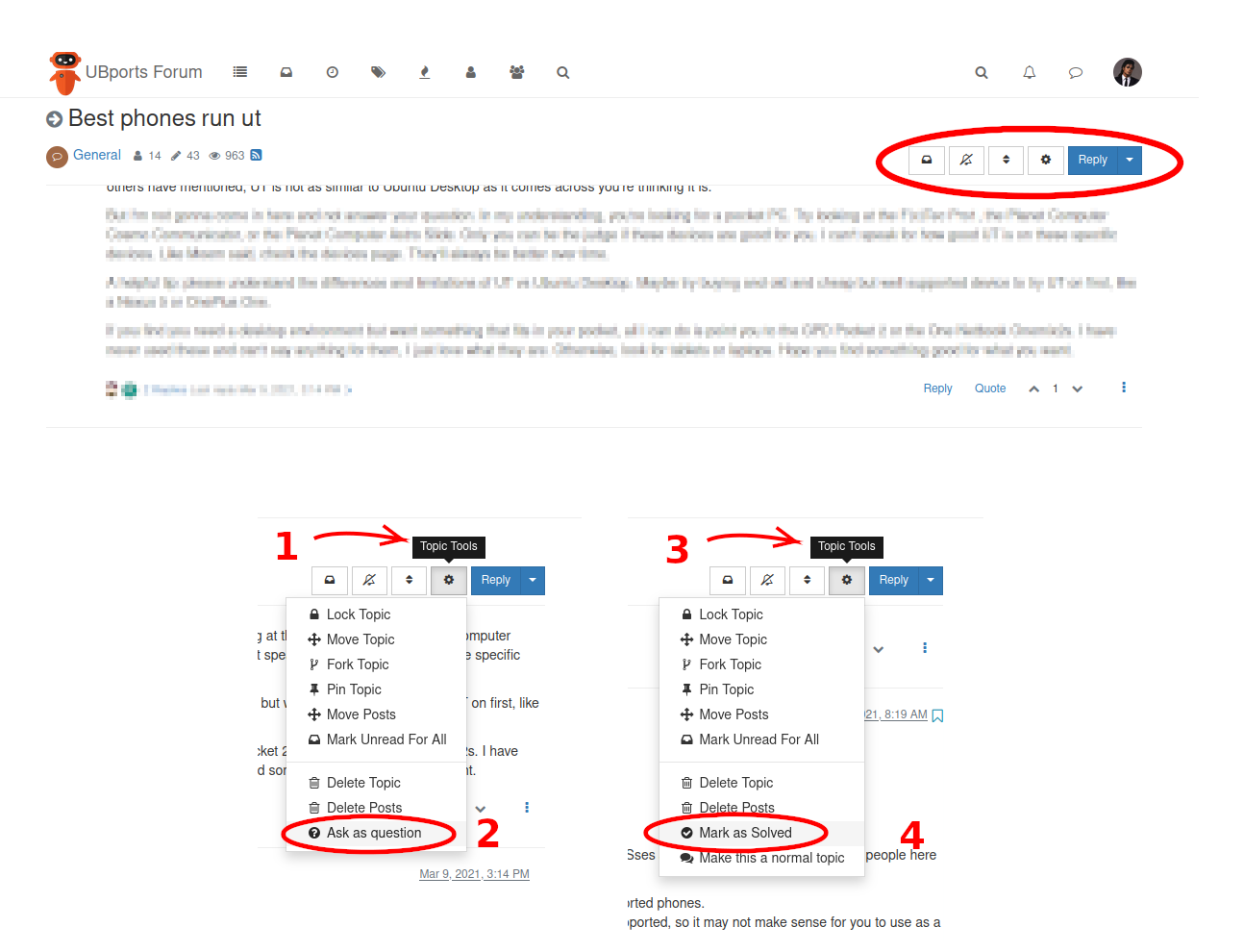
  • [How To] Ask a question and then mark it as solved

    已置頂
    8
    1
    5 評價
    8 貼文
    7k 瀏覽
    M
    @AppLee said in [How To] Ask a question and then mark it as solved: Then read my post again. I did and I got it now. Sorry.
  • New Devices

    已置頂 已鎖定 已移動
    1
    8 評價
    1 貼文
    6k 瀏覽
    尚無回覆
  • The UBports Tutorial Links Collection

    已置頂 已鎖定
    1
    13 評價
    1 貼文
    6k 瀏覽
    尚無回覆
  • No internet connection since update to 24.04-1.1 on FP4

    Solved
    21
    2 評價
    21 貼文
    353 瀏覽
    G
    Still working fine More info here: https://forums.ubports.com/post/91464
  • 1 評價
    23 貼文
    3k 瀏覽
    G
    said in What are a few straightforward ways to write notes in Ubuntu Touch and be able to get them on the Internet/WWW on my Debian PC?: emacs While all packages should work just fine inside of Libertine, the main issue is making the desktop tools usable on the phone. Libertine Tweak Tool was good for resizing text on the app to a comfortably readable font on a phone screen, only thing missing now is modifier keys on the software keyboard, and a way to force the keyboard to appear inside of emacs for me: this is because the 'touch-to-click' compatibility system isn't always the most reliable, and a program like emacs is of course macro-heavy. My biggest way around the Desktop / Mobile syncing problem actually comes down to avoiding it as much as possible, by having my phone do (almost) everything, as syncing takes time while HDMI output to an external display is instant
  • How do add a blog to the UBPorts blog page?

    Unsolved
    2
    0 評價
    2 貼文
    43 瀏覽
    LakotaubpL
    @RJDan Write it up and send it to me via a pm. We can sort it out from there and thanks for running this, same again next year?
  • No Network Connectivity – microphone is not working

    Unsolved
    7
    0 評價
    7 貼文
    118 瀏覽
    Eric HE
    @bunt7 said in No Network Connectivity – microphone is not working: I am sure to installed it from Android 10. The MIUI image version to use is specified in the installation guide under "2. Check the correct version of MIUI". I use the microphone very often, so it would makes things much easier to solve it. There is a know bug with microphone : The microphone does not work after a call, except for calls Unsure it's the same bug you've met, but it's worth checking out. More details at https://gitlab.com/EricHeintzmann/ubuntu-touch/xiaomi-surya/-/issues/26
  • Pure Maps giving nonsense routing commands with vers 3.4.1

    Unsolved
    9
    0 評價
    9 貼文
    538 瀏覽
    U
    @pparent The update 3.4.2 has the same bug, you are right. I made again a fresh install getting ... the old bug. To my surprise the English language machine was o.k. for the United States English language - the English laguage for United Kingdom had the bug... Could it be a matter of changing from Focal to Noble? Was there some change in PICO TTS? I am still hoping for a little Christmas wonder...
  • Calendar and Alarms issue

    Solved
    33
    0 評價
    33 貼文
    572 瀏覽
    dR0WD
    @lduboeuf If I remember correctly I was on 24.04-2.x when happened. Then I switchted back to 24.04-1.x stable and again to 24.04-1.x daily thinking that probably this would be solved... with no luck. I don't know if this can help you.
  • Backup and restore (TWRP-style)

    Unsolved
    25
    0 評價
    25 貼文
    624 瀏覽
    G
    @Vlad-Nirky Hmm, not sure. Running adb root for me gives error message adb: unable to connect for root: closed, but I can use sudo inside adb shell: using that would probably let me get a step closer, by allowing me to copy data to an SD card for instance. The problem is my computer isn't an adb client so I can't just use my phone as a host and run adb root on it. Going back to the module installation, I should definitely look into that (or whatever procedure I need to enable adb root), as it sounds better than the whole hassle of the SD card (which funnily enough is one of TWRP's limitations). [UPDATE] I've been told by an admin of UT's Telegram group that adb root simply hasn't been added to UT. This shouldn't be a problem, as utilities like rsync and scp, which are meant to work over a network, can be set up to work over for example USB (or maybe even Ethernet, don't know which would be faster or in what scenario). I may test backing up and restoring a Waydroid container with SD card, SSD and PC (using sudo on UT so that I have the priviledges to save all kinds of rights). I've been told by the same admin this works: therefore, all that's left is finding the right command for the job, so that it restores a Waydroid container to a working state (although this procdeure should be applicable to any app or user data or configuration).
  • Manpages in terminal?

    6
    1 評價
    6 貼文
    1k 瀏覽
    G
    @hummlbach isn't there a way to unminimize like in Ubuntu? Like, surely I don't have to install every man page manually...
  • Enabling MAC randomization

    Unsolved
    28
    1 評價
    28 貼文
    2k 瀏覽
    G
    said in Enabling MAC randomization: I'll see how it works. 10 days later, I have not seen any problem running with Mac randomization, and I use Wifi every day. On the 'getting the list of stations' subject, I have noticed something new: when I go to Wifi settings and there is nothing displayed (except the access point the phone is connected to, that is), if in a (ssh) console I enter sudo iw dev wlan0 scan the phone screen displays magically the list that was scanned. I don't know what this could mean, maybe the list is cached somewhere and sometimes the cache is stale and not refreshed automatically or it's something else. The cache hypothesis is confirmed just now, I had left displayed a list of wifi stations, left the phone rest for some time, after unlocking it the list has disappeared. There is a wrinckle though: sometimes entering the refresh command, the reply of the command is 'scan aborted!'. This could also be what happens when it does not work. Unfortunately in both cases, the command is displayed in the system journal, but when something goes wrong nothing more is displayed. Sometimes the list vary from one execution to the next a few seconds later, but maybe it's because it's radio after all. Or there is a too short timeout. More investigation is needed (but I'm not giving up, this is only a follow-up). Last thing: the 'scan' command has a [randomise[=<addr>/<mask>] flag, so the randomization can be at 2 levels (scan and normal use) and can not to be done at the scan level, although I don't see why this could have 2 different results on 2 configuration that seem the same. I don't even know why there are 2 levels in the Mac randomization. The only thing I know for sure is that there are some wifi hardware/firmware/driver (?) that do not support Mac randomization (because I have read it in the configuration files for the FP5) so it could be remotely possible that some configuration don't support the randomization at the scan level while supporting it for normal use.

  • What's the situation with blue light filtering on Ubuntu Touch?

    blue light red light
    28
    1 評價
    28 貼文
    11k 瀏覽
    G
    @advocatux it's hard to stop myself from doing so sometimes XD
  • Support for In display fingerprint one plus pro

    Unsolved
    5
    0 評價
    5 貼文
    89 瀏覽
    MoemM
    @Shapa Thank you! I hope the porter or maintainer will make it official/supported. Would be cool to have it in the installer!
  • Recent update - keyboard doesn't appear to allow login

    Unsolved
    10
    0 評價
    10 貼文
    125 瀏覽
    Vlad NirkyV
    @padraic For a next time, to verifiy the device, you must enable developper mode in system settings / System information. Connect the usb. Accept the connection on the phone. adb devices must show you your phone.
  • 0 評價
    4 貼文
    107 瀏覽
    K
    @qrvhh Have you tried reloading the page after signing in? I don't think we really do have proper handling of login popup windows.
  • GPS location does not work anymore in webview (Noble)

    Unsolved
    10
    0 評價
    10 貼文
    477 瀏覽
    pparentP
    It does work better in 24.04-1.1 that it did in 24.04-1.0. I'm using google maps app from @chromiumos-guy If I open the app outdoor when I have access to my location it will usually work. BUT it will freeez/crash very easilly if I try to access the position when I don't have access to it (indoor) or that I click a second time on the position icon. Once it has crashed or freezed it will not work anymore until I reboot the phone.